Comparison · Tools & workflows
Gitleaks vs TruffleHog vs Betterleaks: What Each Misses
Gitleaks is now security-patch-only, Betterleaks is its successor, and TruffleHog checks whether keys are live. On nine fake credentials each missed something, and one documented TruffleHog hook let a staged token through.
Owen Prestwick · Nov 28, 2026 · 8 min read
On this page
Gitleaks, TruffleHog and Betterleaks all catch the obvious leak: an API key typed into a file and committed. They split on everything else. On a throwaway repo with nine fake credentials, Gitleaks and Betterleaks missed a password inside a Postgres URL, TruffleHog missed a plain ADMIN_PASSWORD string, and one of TruffleHog's two documented pre-commit setups let a staged GitHub token and Stripe key straight through.
There is also a maintenance change to plan for. Since May 21, 2026, the Gitleaks README says the project is feature complete and will only get security patches, and its author now works on Betterleaks. So the practical answer for most teams is a regex scanner as the commit hook, Betterleaks for new setups, plus TruffleHog with verification in CI and for history audits. The rest of this piece shows the check behind that split and the settings to get right.
What this comparison covers
The job here is narrow: stop a credential before it reaches a shared Git remote, and find the ones already in history. That is the commit-and-push layer from our guide to stopping AI coding agents leaking secrets. It matters more now that agents write and commit code for you. A hook is the point where an agent hits the same wall a person would.
It does not rank detection accuracy across thousands of real leaks. Metarix did not run a benchmark. It also leaves out server-side tools. GitHub Secret Protection, which includes push protection, is listed at $19 USD per active committer per month on GitHub's plans page (checked Nov 28, 2026), and it belongs next to any of these three, not instead of them.
Scroll the table horizontally on smaller screens.
| Detail | Gitleaks | Betterleaks | TruffleHog |
|---|---|---|---|
| Latest stable release | 8.30.1 (Mar 21, 2026) | 1.10.1 (Nov 12, 2026); v2.0.0-rc.16 (Nov 27) | 3.100.1 (Nov 23, 2026) |
| Maintenance | Feature complete; security patches only | Active; v2 in release candidates | Active |
| License | MIT | MIT | AGPL-3.0 |
| Default rules | 222 regex rules | 466 rules, 229 with a validate expression | 800+ secret types (project's figure) |
| Checks if a key is live | No | Opt-in (--validation in v1, -v in v2) | On by default |
| Generic password rule | Yes (generic-api-key) | Yes (generic-password) | No |
| Repo config file | Loads .gitleaks.toml from the target | Only with --unsafe-auto-load-config | Not auto-loaded; pass --config |
| Paid tier | None (the GitHub Action needs a free license key for org repos) | None | TruffleHog Enterprise, by quote |
Nine fake keys, one repo: the check
Metarix built a throwaway Git repo on Nov 28, 2026 and planted nine fake credentials. Seven were random strings shaped like real formats (AWS, Slack webhook, Postgres URL, GitHub classic token, Stripe live key, OpenAI and Anthropic keys), one was a plain password string, and one was a freshly generated RSA key that was never used anywhere. They sat in four places: committed and then deleted, in a tracked file at HEAD, in a gitignored .env, and staged but not yet committed.
Each tool ran with its default rules and no config file: Gitleaks 8.30.1 and Betterleaks 1.10.1 in git, dir and git --pre-commit --staged modes, and TruffleHog 3.100.1 in git and filesystem modes plus both documented hook setups. One sample per credential type says nothing about detection rates. It does show which scan mode can see which place, and where the rule sets differ.
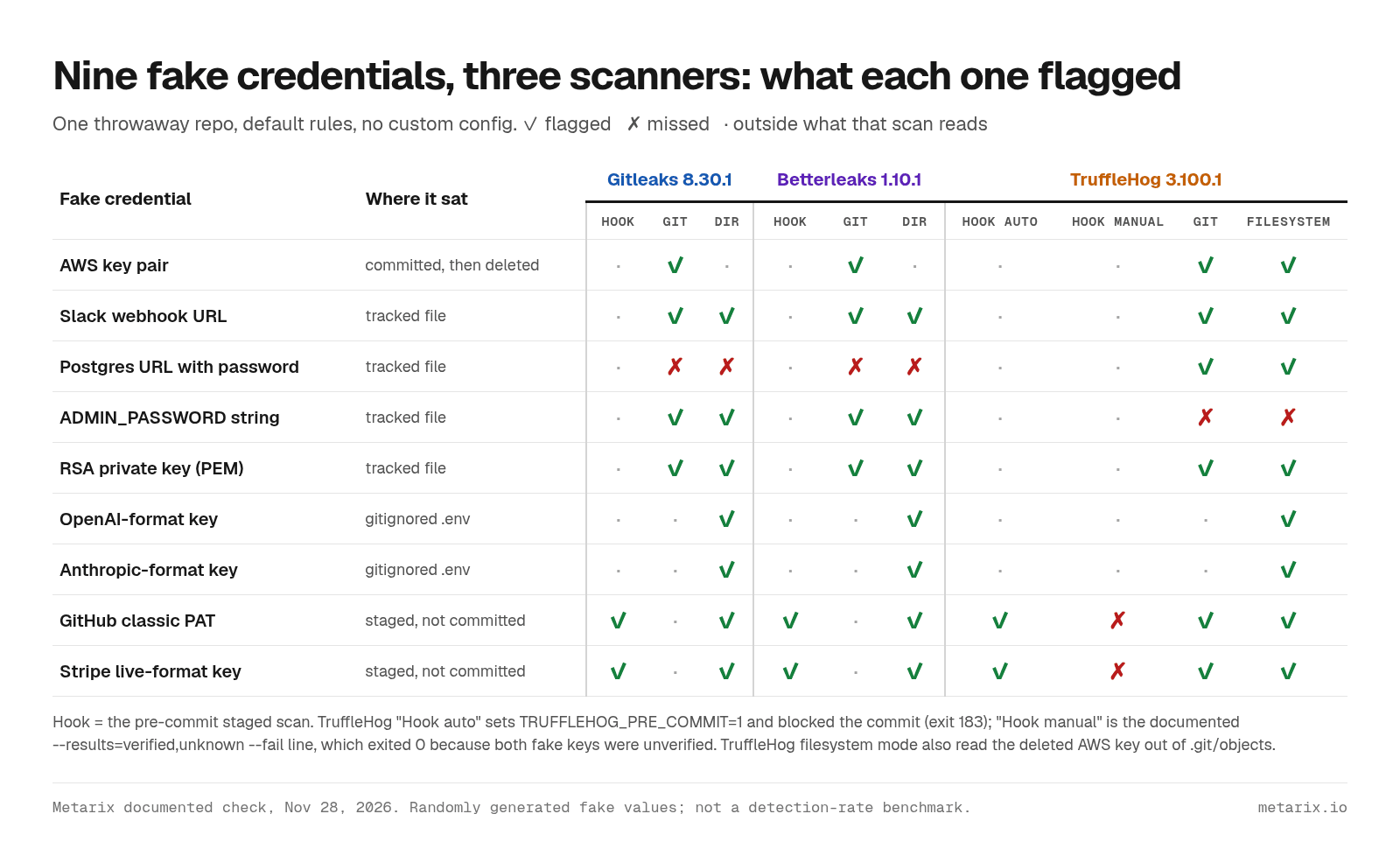
Three results are worth acting on.
- Git mode never sees ignored files. The OpenAI- and Anthropic-format keys in the gitignored
.envwere invisible to everygitscan. Only the folder scans (dir,filesystem) found them. That is the file a coding agent is most likely to read. - History needs a history scan. The AWS key that was committed and then deleted showed up in every
gitscan and in no hook. TruffleHog's filesystem mode also found it, because it read the Git object files inside.git. Gitleaks' and Betterleaks'dirscans did not. - The rule sets have different holes. Neither Gitleaks nor Betterleaks flagged the Postgres URL password. TruffleHog's Postgres detector did. TruffleHog has no generic password rule, so
ADMIN_PASSWORD = "..."passed it, while Gitleaks (as generic-api-key) and Betterleaks (as generic-password) both flagged it.
TruffleHog's hook has two modes, and they disagree
TruffleHog's pre-commit documentation offers two setups. The recommended one is to set TRUFFLEHOG_PRE_COMMIT=1 and run trufflehog git file://.. The tool also switches on hook mode by itself when it sees PRE_COMMIT=1, which the pre-commit framework sets, or Husky's variables. The manual one is a single line: trufflehog git file://. --since-commit HEAD --results=verified,unknown --fail --trust-local-git-config.
In the check, the automatic mode reported both staged fake keys as unverified and exited with code 183, which blocks the commit. The manual line verified the same two keys, got nothing back that proved them live, filtered them out and exited 0. The commit went through. Running with PRE_COMMIT=1 gave the same result as the automatic mode.
The manual line is doing what its flags say: report only keys that are verified live, or that could not be checked because of an error. Fake keys are dead, so letting them through is the intended outcome. The surprise is the automatic mode. A comment in TruffleHog's main.go says hook mode should show only verified and unknown results, yet 3.100.1 reported and blocked on unverified ones. Treat that as current behaviour that could change in a later release, and test your own hook.
So decide what you want before you copy either snippet:
- Block anything that looks like a credential, live or not: use Gitleaks or Betterleaks as the hook, or TruffleHog's automatic mode as it behaves in 3.100.1.
- Block only keys proven live: use the manual line. Expect every commit with a candidate to call out to that provider's API, and expect the hook to need network access.
- Either way, check the exit code on a staged fake key before you roll the hook out to the team.
If you run Gitleaks today
Nothing breaks. Gitleaks 8.30.1 still works, and the README still points to its pre-commit hook and Gitleaks-Action. What changes is direction: the README commit of May 21, 2026 says new features will not be merged and that the author's focus has moved to Betterleaks. Betterleaks' 1.10.1 config has 466 rules against Gitleaks' 222.
Moving is mostly a binary swap. Betterleaks keeps the git, dir and git --pre-commit --staged commands, and its v1 branch publishes a pre-commit hook with id betterleaks. Three things need attention:
- Your config will be ignored unless you point at it. Gitleaks loads
.gitleaks.tomlfrom the scanned repo. Betterleaks does not, unless you pass--unsafe-auto-load-config, per its config docs. In the check, a.gitleaks.tomlallowlist that excludedsettings.pycut Gitleaks' findings from 7 to 5; Betterleaks still reported all 7 until the flag was added. Use--configor setGITLEAKS_CONFIG, which Betterleaks also reads. - Rule IDs differ. The same password line was generic-api-key in Gitleaks and generic-password in Betterleaks. A Gitleaks fingerprint includes the rule ID, so check any ignore list or baseline built on Gitleaks fingerprints against a fresh Betterleaks run before you trust it.
- Pick v1 or v2 on purpose. v2 is still a release candidate. Its migration guide lists a new JSON report shape, validation behind
-v, and an SDK module path change. Until v2.0.0 ships, the README says package managers and Dockerlatestmay still give you v1. Pin the version in your hook config either way.
Which one to run where
Use this as the decision rule:
- Pre-commit hook on developer machines: Betterleaks for a new setup, or keep Gitleaks if it already works and you accept security-only updates. They run offline, block on anything that looks like a credential, and include a generic password rule.
- Pull requests in CI: TruffleHog with verification, using the project's GitHub Action and
--results=verified,unknown. A verified hit there means rotate the key now, not open a ticket. - One-off history audit: run TruffleHog
gitand Betterleaksgitover full history. Their rule sets missed different things in the check, and running both costs little. - Before you start an agent in a folder: run a folder scan (
betterleaks dir .ortrufflehog filesystem .). Git-mode scans will not show you the.envthe agent can read. Our guide to coding agent hooks and permissions shows where a check like this can sit in the agent's own lifecycle. - On the server: turn on push protection. Hooks only run where they are installed, and
git commit --no-verifyskips them. For keys that already reached a public repo, GitHub's public monitoring API and webhooks are the next layer.
Two notes on licensing and cost. All three CLIs are free. TruffleHog is AGPL-3.0, so read the license terms before you modify it or build it into a product you ship; its pricing page lists the Enterprise tier as contact-sales. Gitleaks-Action needs a free license key for repos owned by a GitHub organization.
Check your setup this week
- Stage a file with a fake token in the right format (a
ghp_prefix and 36 random characters works) and rungit commit. If it goes through, your hook is not doing what you think. - If you use TruffleHog's manual hook line, decide whether passing unverified keys is what you want, and write that down.
- If you plan to switch to Betterleaks, run it once with
--configpointing at your current Gitleaks file and compare the findings count with Gitleaks before changing the hook. - Add one folder scan to your agent setup script, before the agent starts.
- Have an org admin confirm push protection is on for every repo that matters. Developers cannot do that step for you.
Our take
Run two scanners, in two places. A regex hook (Betterleaks for new setups) catches the most before anything leaves the laptop. TruffleHog in CI tells you which leaks are live. The check showed each tool missing a credential the other caught, and it showed that a TruffleHog hook copied from the docs can pass a staged token it cannot prove live. Test the hook with a fake key before you trust it. Versions and behaviour checked on Nov 28, 2026; Metarix will recheck them by Feb 26, 2027, or sooner when Betterleaks v2 goes stable.
Sources
- Gitleaks README and v8.30.1 release; README change of May 21, 2026
- Betterleaks README, v1.x branch, config loading docs, v2 migration guide and releases
- TruffleHog README, pre-commit hook documentation, main.go hook-mode code and v3.100.1 release
- Gitleaks-Action README, license key requirement
- Truffle Security pricing and GitHub Advanced Security plans, checked Nov 28, 2026
- Metarix documented check, Nov 28, 2026: Gitleaks 8.30.1, Betterleaks 1.10.1 and TruffleHog 3.100.1 Linux x64 release binaries, default rules, one throwaway repo with nine randomly generated fake credentials. TruffleHog verification calls ran against fake keys only. Not a detection-rate benchmark.
Tools covered in this guide
Frequently asked questions
- Does TruffleHog send my secrets to third parties?
- With verification on, which is the default, TruffleHog sends each candidate credential to the API of the provider it appears to belong to, for example AWS for an AWS key. Use --no-verification to keep scans local, at the cost of not knowing which findings are live.
- Is Gitleaks deprecated?
- Not formally. Since May 21, 2026 its README says it is feature complete and will receive security patches only, and the author now works on Betterleaks. Existing setups keep working.
- Can a pre-commit hook stop an AI coding agent from committing a secret?
- Yes, if the hook is installed in that clone and the agent does not commit with --no-verify. The agent sees the same failed commit a person would. Keep push protection on the server as well, because hooks only run where they are installed.
- Do these tools scan files I have not committed?
- Only in folder mode. gitleaks dir, betterleaks dir and trufflehog filesystem read files on disk, including gitignored ones such as .env. The git modes read commits, and the hook modes read staged changes.