Comparison · Agents, APIs & MCP
LLM API Rate Limits Compared: OpenAI, Claude, Gemini
How OpenAI, Anthropic and Google set API rate limits and usage tiers, what counts toward them, and which 429 errors you should retry, with limits as of Nov 17, 2026 and a tested retry wrapper.
Metarix Editorial · Nov 17, 2026 · 12 min read
Documentation-based research
On this page

LLM API rate limits decide how many requests and tokens your app can push through a model each minute or day, and usage tiers decide how high those limits go. OpenAI, Anthropic and Google all raise your limits automatically as you spend, but they measure tokens differently, cap monthly spend differently, and send back 429 errors that mean very different things.
This guide compares the OpenAI API, the Claude API from Anthropic and the Gemini API side by side, explains which 429s you should retry and which you shouldn't, and ends with a retry wrapper we ran against a local mock server. All tiers, caps and limits are as of Nov 17, 2026, taken from each provider's official documentation and linked inline. They change often, so treat the console as the final word for your own account.
Quick verdict
Don't design around the published tables. Design around the error you'll actually get. Read the error body on every 429: a spend cap or daily quota won't clear in a few seconds, while a per-minute limit will. Then fix throughput at the source. On Claude, prompt caching raises your effective input limit because cache reads don't count toward it. On OpenAI, set max_tokens close to the real output size. On all three, move offline work to the Batch API, which has its own limit pool and costs half as much.
Scroll the table horizontally on smaller screens.
| Area | OpenAI API | Claude API | Gemini API |
|---|---|---|---|
| Limit dimensions | RPM, TPM, RPD, TPD, images per minute | RPM, input TPM (ITPM), output TPM (OTPM) | RPM, input TPM, RPD (plus TPD or IPM on some models) |
| Applied to | Organization and project | Organization (optional lower workspace limits) | Project, not API key |
| Paid tiers | Build, Launch, Grow | Start, Build, Scale, Custom (new orgs may start in Evaluation) | Tier 1, Tier 2, Tier 3 |
| How you move up | Total credit purchases: $5, $100, $500 | Usage history and account standing | Cumulative Google Cloud spend plus days since first payment |
| Monthly cap at top self-serve tier | $200,000 (Grow) | $200,000 (Scale) | $20,000 to $100,000+ (Tier 3) |
| Burst or ramp limit | Yes: 429 slow_down | Yes: 429 ramp_limit_exceeded | Spend-based limit per rolling 10 minutes |
| Rate-limit headers | x-ratelimit-* and Retry-After | anthropic-ratelimit-* and retry-after | Not documented on the rate-limits page; see AI Studio |
| Where to see your limits | Settings > Organization > Limits | Console > Rate limits page | AI Studio rate-limit page |
How LLM API rate limits work
Every provider counts more than one thing at once, and you hit whichever limit fills first. OpenAI's own example: with a 20 RPM limit, 20 tiny requests use up your minute even if you've sent only a fraction of your tokens (OpenAI rate limits). Google says the same thing about the Gemini API: the 21st request in a minute fails on a 20 RPM limit no matter how few tokens it carries (Gemini rate limits).
The units
- RPM (requests per minute): caps how many calls you make. Chatty agents with many small tool calls hit this first.
- TPM (tokens per minute): caps volume. OpenAI uses one TPM figure per model. Anthropic splits it into input (ITPM) and output (OTPM). Google's TPM counts input tokens.
- RPD and TPD (per day): daily quotas. Gemini's RPD resets at midnight Pacific time.
- Spend caps: a monthly dollar ceiling per tier, separate from the per-minute limits and from any budget you set yourself.
- Ramp limits: a cap on how fast your usage can grow, even while you're under the per-minute numbers.
Windows are smoother than they look
Anthropic uses a token bucket: capacity refills continuously up to your maximum instead of resetting at the top of each minute. It also warns that a 60 RPM limit may be enforced as one request per second, so a burst of 30 calls in two seconds can fail even if your minute total is fine (Claude rate limits). In practice, assume every provider punishes bursts and spread requests evenly.
Usage tiers compared
All three providers move you up automatically. What triggers the move is different, and so is the monthly cap that comes with each tier.
Scroll the table horizontally on smaller screens.
| Provider | Tier | How you qualify | Monthly cap |
|---|---|---|---|
| OpenAI | Free | Be in an allowed geography | $100 usage limit |
| OpenAI | Build | $5 in total credit purchases | $500 |
| OpenAI | Launch | $100 in total credit purchases | $5,000 |
| OpenAI | Grow | $500 in total credit purchases | $200,000 |
| Anthropic | Evaluation | New orgs or limited usage history; limits below the standard tables | Not stated |
| Anthropic | Start | Placed automatically on usage history and standing | $500 |
| Anthropic | Build | Placed automatically | $1,000 |
| Anthropic | Scale | Placed automatically | $200,000 |
| Anthropic | Custom | Arranged with sales | No monthly cap |
| Free | Active project or free trial; some projects need verification | N/A | |
| Tier 1 | Linked, active billing account | $250 | |
| Tier 2 | $100 paid and 3 days since first successful payment | $2,000 | |
| Tier 3 | $1,000 paid and 30 days since first successful payment | $20,000 to $100,000+ |
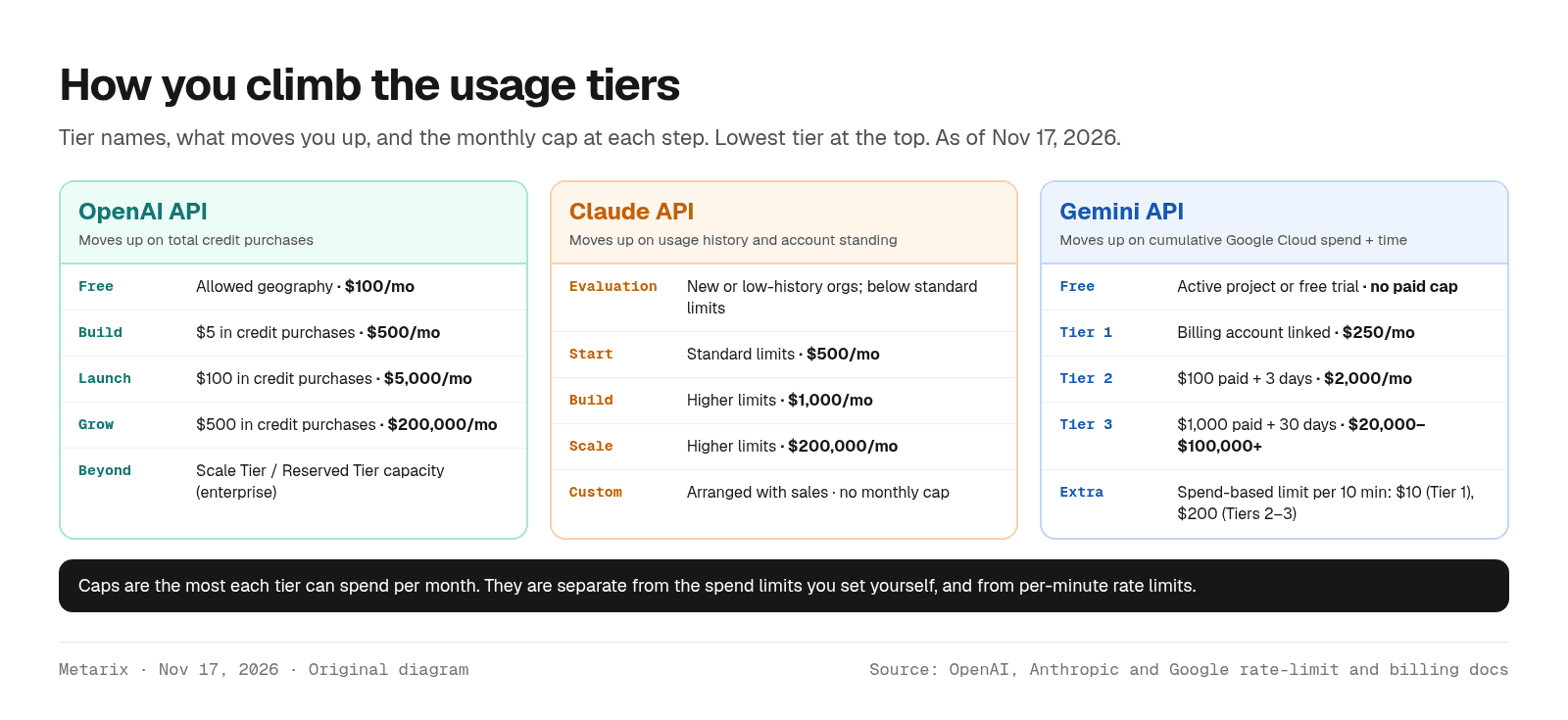
A few details matter more than the table suggests. OpenAI's tier is driven by money you've prepaid, so a $100 top-up is enough to qualify for Launch. Anthropic publishes no dollar thresholds; tiers follow usage history, and you can ask for more with Request tier increase on the Console's rate-limits page. Google counts spend on any Google Cloud service on the linked billing account, not just Gemini, and adds a waiting period. Google says moving from Free to Tier 1 is usually instant and later upgrades take effect within 10 minutes (rate limits).
Google also has a limit the other two don't: a spend-based rate limit over a rolling 10-minute window, $10 on Tier 1 and $200 on Tiers 2 and 3, applied depending on billing history. A few long-context requests to an expensive model can trip it before you get anywhere near your RPM (Gemini rate limits).
Spend caps vs your own budget
Each provider lets you set a lower budget, and each one fails differently when you reach it. OpenAI's hard spend limit returns a 429 for affected requests, while a spend alert only notifies you (spend limits). On the Claude API, a limit you set yourself returns HTTP 400 invalid_request_error, but the tier cap returns a 429 with enforced_spend_limit_reached and no retry-after header, and access resumes at 00:00 UTC on the first of the next month. On Gemini, a project cap can be set in AI Studio, and Prepay accounts get HTTP 402 when the credit balance hits $0 (API errors).
Example limits by model
The numbers below show the shape of each provider's ladder. They are not directly comparable: the models differ, OpenAI counts one TPM figure, Anthropic splits input and output, and Google publishes most per-model limits only inside AI Studio.
Scroll the table horizontally on smaller screens.
| Provider and model | Entry paid tier | Middle tier | Top self-serve tier |
|---|---|---|---|
| OpenAI Astra, Sol, Terra models (RPM / TPM) | Build: 5,000 / 1,000,000 | Launch: 10,000 / 4,000,000 | Grow: 15,000 / 40,000,000 |
| OpenAI Luna models (RPM / TPM) | Build: 5,000 / 2,000,000 | Launch: 10,000 / 10,000,000 | Grow: 30,000 / 180,000,000 |
| Claude Sonnet 5.5 (RPM / ITPM / OTPM) | Start: 4,000 / 2,000,000 / 400,000 | Build: 10,000 / 5,000,000 / 1,000,000 | Scale: 13,000 / 10,000,000 / 2,000,000 |
| Claude Fable 5.2 (RPM / ITPM / OTPM) | Start: 4,000 / 500,000 / 100,000 | Build: 10,000 / 1,500,000 / 300,000 | Scale: 13,000 / 4,000,000 / 800,000 |
| Gemini Decision 1 (RPM / TPM / RPD) | Tier 1: 1,500 / 1,000,000 / 50,000 | Tier 2: 5,000 / 4,000,000 / unlimited | Tier 3: 15,000 / 10,000,000 / unlimited |
| Other Gemini models | Shown per project in AI Studio | Shown per project in AI Studio | Shown per project in AI Studio |
Watch for shared buckets. OpenAI lists some model families under a shared limit, so all of them draw from one TPM figure. Anthropic combines several older models into one bucket (for example Opus 4.5 to 4.8) while newer models such as Opus 5.5 get their own. Long-context requests on some OpenAI models have a separate limit, and Anthropic's US-only and global inference draw from the same pool.
What actually counts toward your limit
This is where the providers differ most, and where most wasted headroom hides.
- Claude counts only uncached input toward ITPM. Cache reads don't count; cache writes do. Anthropic's example: with a 2,000,000 ITPM limit and an 80% cache hit rate, you can process about 10,000,000 input tokens a minute (Claude rate limits). If you run long system prompts or agent tool definitions, caching is the cheapest limit increase you'll get. Our prompt caching break-even guide covers when the write cost pays off.
- OpenAI counts `max_tokens` up front. OpenAI says your rate limit is calculated from the larger of
max_tokensand the estimated size of the request, so an oversizedmax_tokenseats TPM you never use (OpenAI rate limits). Set it close to the real output length. - Claude doesn't. Anthropic evaluates OTPM on tokens actually generated, and says
max_tokenshas no rate-limit downside. - Failed requests still count on OpenAI. Unsuccessful requests use up your per-minute limit, so a tight retry loop makes things worse.
- Gemini limits are per project. Adding API keys in the same project doesn't add capacity. Built-in tools have their own limits too: Grounding with Google Search on Gemini 3 and newer has a default of 1,500 requests per day per project.
Not every 429 is a rate limit
The status code alone tells you very little. All three providers use 429 for several different situations, and only some of them clear if you wait.
Scroll the table horizontally on smaller screens.
| Provider | Signal in the response | Meaning | Retry? |
|---|---|---|---|
| OpenAI | 429 rate-limit error (Retry-After when present) | Per-minute or per-day limit | Yes, after Retry-After plus jitter, or backoff |
| OpenAI | 429, error code slow_down | Traffic grew too fast (ramp limit), even under RPM/TPM | Yes, after Retry-After; then ramp gradually |
| OpenAI | 429 from a hard spend limit you set | Monthly budget reached | No; raise the limit |
| Anthropic | 429 rate_limit_error with retry-after | RPM, ITPM or OTPM exceeded | Yes, after retry-after |
| Anthropic | 429, error_code ramp_limit_exceeded | Usage rose too sharply | Yes; hold traffic, add at most one step per minute |
| Anthropic | 429, error_code enforced_spend_limit_reached, no retry-after | Tier's monthly spend cap reached | No; resumes 00:00 UTC on the 1st or after a tier increase |
| 429 rate_limit_exceeded or too_many_requests | Per-minute or per-second limit | Yes, with exponential backoff | |
| 429 quota_exceeded | Daily quota used up | Not until the quota resets | |
| 429 RESOURCE_EXHAUSTED from the spend-based limit | Too much spend in 10 minutes | Yes, after a short wait; reduce expensive requests |
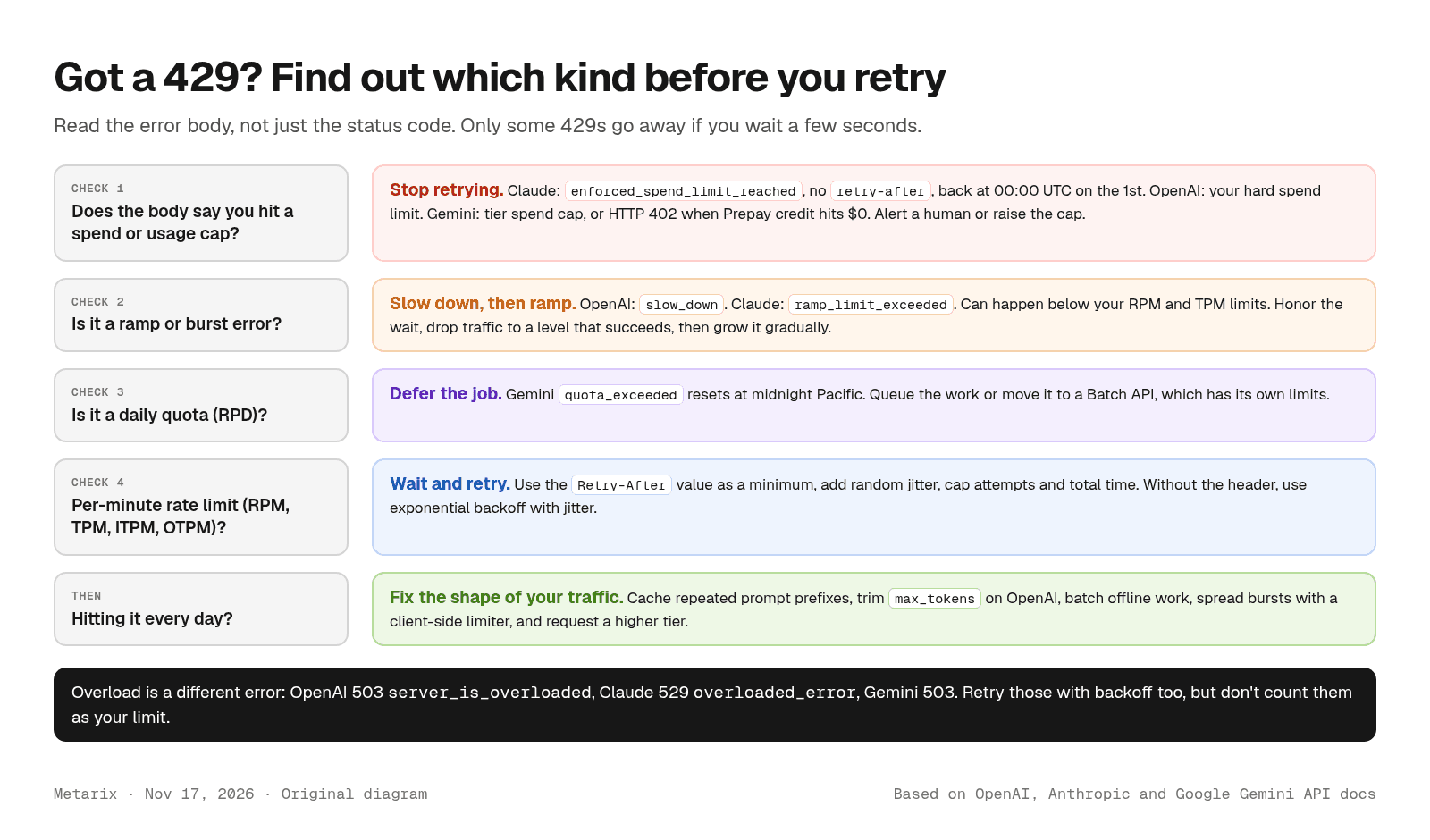
Overload is a separate signal. OpenAI returns 503 server_is_overloaded, Anthropic returns 529 overloaded_error (Claude errors), and Google returns 503. These are about the provider's capacity rather than your limit, so back off and retry, but don't lower your own rate limiter because of them.
Ramp limits catch launches and batch jobs
Both OpenAI and Anthropic now limit how fast you can grow. OpenAI's rule of thumb is that once you reach 1 million input tokens per minute, you should grow by no more than 50% every 15 minutes. Anthropic sets your ramp limit at your recent peak plus a step, and the Message Batches API isn't subject to it. If a nightly job starts by firing thousands of requests at once, it will hit these limits even on a high tier. Start slow and spread the load.
How to handle 429 errors in code
All three official SDKs retry some errors for you. Anthropic's SDK retries twice by default and honors retry-after. Google's Python SDK retries up to four times with delays from about 1 to 60 seconds (troubleshooting). OpenAI's SDKs retry eligible 429 and 503 responses subject to their retry settings, and OpenAI warns that handling of long Retry-After values varies by SDK version. If you add your own retry loop, turn SDK retries off or count them, so the two don't multiply.
The rules every provider's docs agree on:
- Treat
Retry-Afteras a minimum, and add a little random jitter so your workers don't all retry at once. - Without the header, use exponential backoff with jitter: about 1s, 2s, 4s, 8s, capped.
- Cap both the number of attempts and the total time. If the server asks you to wait longer than your budget, defer the job instead of retrying early.
- Never retry spend caps, depleted credit (402), auth errors or bad requests.
- For streaming, these HTTP errors arrive before the stream starts. Don't replay a request automatically after you've already consumed output.
Here is a small, provider-agnostic wrapper that follows those rules. It is illustrative: adapt the error-code list to the SDK you use.
import random, time# Codes that mean a cap was reached; waiting a few seconds will not help.NO_RETRY_CODES = {"enforced_spend_limit_reached", "quota_exceeded"}RETRY_STATUS = {429, 500, 503, 529}def call_with_retry(send, max_attempts=6, base=1.0, cap=60.0, budget=120.0): """send() returns (status, headers, body). Retries transient errors only.""" start = time.monotonic() for attempt in range(1, max_attempts + 1): status, headers, body = send() if status < 400: return body err = (body or {}).get("error", {}) code = (err.get("details") or {}).get("error_code") or err.get("code") if status not in RETRY_STATUS or code in NO_RETRY_CODES or status == 402: raise RuntimeError(f"not retryable: {status} {code}") if attempt == max_attempts: raise RuntimeError(f"gave up after {attempt} attempts") backoff = random.uniform(0, min(cap, base * 2 ** (attempt - 1))) # full jitter hint = headers.get("retry-after") delay = float(hint) + random.uniform(0, 1) if hint else backoff if time.monotonic() - start + delay > budget: raise RuntimeError("retry budget exceeded, defer the job") time.sleep(delay)
We ran this wrapper on Nov 17, 2026 against a local mock server, not a live API. A 429 with retry-after: 1 succeeded on the third call after about 2.3 seconds. A Claude-style spend-cap 429 failed after one call with no retry. Three 503 overload errors without a header succeeded on the fourth call in under a second. A 429 asking for a 600-second wait was deferred right away instead of blocking the worker.
Read the headers before you hit the wall
OpenAI returns x-ratelimit-remaining-requests, x-ratelimit-remaining-tokens and matching reset headers, plus project-level token headers when a project limit applies. Anthropic returns anthropic-ratelimit-requests-remaining, anthropic-ratelimit-input-tokens-remaining, anthropic-ratelimit-output-tokens-remaining and RFC 3339 reset times, and the Console can show the same data as charts or through the Rate Limits API. Feeding these values into a client-side limiter lets you slow down before the 429 instead of after it. Gemini's rate-limits page points you to AI Studio for current usage instead.
Get more throughput without a tier bump
- Batch everything that can wait. OpenAI's Batch API costs 50% less, completes within 24 hours, and uses a separate pool that doesn't touch your per-model limits (Batch guide). Anthropic's Message Batches API is also 50% off with its own limits (pricing), and Gemini's Batch API is priced at 50% of standard with separate enqueued-token limits (Batch API).
- Cache stable prefixes. On Claude this directly raises effective ITPM; on every provider it cuts cost and latency.
- Split by workload. Use OpenAI projects or Claude workspace limits so one runaway job can't starve production. Anthropic lets you cap a workspace below the org limit, and the org limit always still applies.
- Pick the right model for volume. On OpenAI's published table, Luna models get much more TPM than Astra, Sol and Terra at the same tier.
- Buy priority only when latency matters. Gemini's Priority tier (preview) has default limits of 0.3x the standard limit and counts toward overall traffic. OpenAI's Fast mode shares the model's standard rate limit (priority processing), and enterprise customers can buy Scale Tier or Reserved Tier capacity.
- Add a fallback route. A gateway can send overflow to a second provider or region when one returns 429s. Our AI gateways comparison covers OpenRouter, Cloudflare and Vercel; OpenRouter fronts many providers behind one key.
If you run Claude through a cloud platform instead of Anthropic's API, quotas are managed by that cloud, not by the tiers above. See our Claude API vs Bedrock vs Vertex AI comparison for how those differ. And if you're tuning for speed rather than volume, LLM latency and throughput explained covers the other half of the problem.
Verdict
For a new project, the fastest way to usable limits is OpenAI: a $5 purchase puts you on Build and $100 on Launch. Gemini gives the most room to prototype for free, but its paid tiers wait on Google Cloud spend and time, and the 10-minute spend limit can surprise you on expensive models. Claude's published limits are generous from the Start tier, and its cache-aware ITPM makes it the easiest to scale for agents that resend the same long context, but new organizations may begin in a lower Evaluation tier.
Whichever you use, build three things before launch: an error classifier that separates caps from rate limits, a retry wrapper with a time budget, and a client-side limiter fed by the response headers. Then move every job that can wait to the Batch API.
Sources
- OpenAI, Rate limits, Batch API, Spend limits, Pricing, accessed Nov 17, 2026
- Anthropic, Rate limits, Errors, Pricing, Prompt caching, accessed Nov 17, 2026
- Google, Gemini API rate limits, Billing, API errors, Troubleshooting, Pricing, accessed Nov 17, 2026
- OpenAI Cookbook, How to handle rate limits
Tools covered in this guide
Frequently asked questions
- What is the difference between RPM and TPM?
- RPM is requests per minute and TPM is tokens per minute. Providers enforce both at once, and you hit whichever fills first. Many small requests usually hit RPM; a few long-context requests usually hit TPM. Anthropic splits TPM into input (ITPM) and output (OTPM) limits.
- How do I increase my OpenAI API rate limit?
- OpenAI moves organizations up its usage tiers automatically as total credit purchases grow: $5 for Build, $100 for Launch and $500 for Grow, as of November 17, 2026. You can see your limits and use Upgrade tier under Settings > Organization > Limits in the OpenAI platform.
- Do cached tokens count toward Claude rate limits?
- Not for input. On the Claude API, tokens read from the prompt cache don't count toward input tokens per minute (ITPM) or ramp limits. Uncached input and tokens written to the cache do count, so a high cache hit rate raises your effective throughput.
- Should I retry every 429 error?
- No. Retry per-minute rate limits and ramp errors after the Retry-After delay, with jitter. Don't retry spend caps (for example Claude's enforced_spend_limit_reached, which has no retry-after header), daily quotas before they reset, or a hard spend limit you set yourself.
- Are Gemini API rate limits per API key?
- No. Google applies Gemini API rate limits per project, so creating more API keys in the same project doesn't add capacity. Requests-per-day quotas reset at midnight Pacific time, and current per-model limits are shown in Google AI Studio.