Guide · Agents, APIs & MCP
AI Coding Agent Hooks and Permissions: A Guide
How Claude Code, Codex CLI, Cursor and Copilot CLI handle permission rules and lifecycle hooks, what happens when a guard hook crashes or times out, and a portable guard script you can adapt.
Metarix Editorial · Nov 16, 2026 · 12 min read
Documentation-based research
On this page
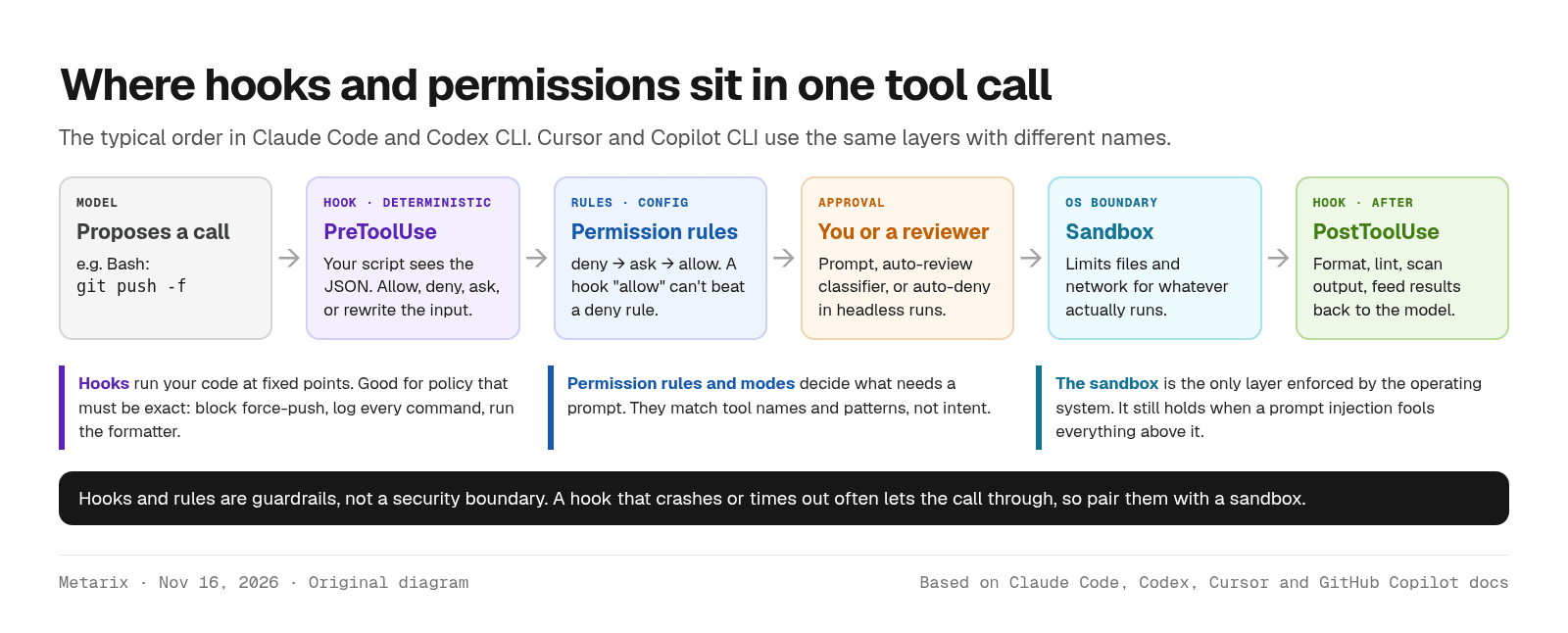
Hooks and permissions are the two controls that decide what an AI coding agent may do on your machine. Permissions (rules and modes) decide which tool calls need your approval. Hooks run your own script at fixed points, such as just before a shell command, and can allow, block or rewrite the call. Neither one is a security boundary on its own; the sandbox is.
This guide compares how Claude Code, Codex CLI, Cursor and GitHub Copilot CLI handle both, as documented on Nov 16, 2026, with notes on Google's Antigravity CLI. It ends with a small guard script that works across all of them, and the failure mode that catches most teams out.
Quick verdict
Use permission rules for the boring 90%: allow your test and lint commands, deny reads of credential files, and ask before anything that pushes, deploys or deletes. Add a PreToolUse hook only for policy that has to be exact, like blocking force-pushes or logging every command. Make the hook fail closed where the tool allows it, and keep the OS sandbox on, because a hook that crashes or times out usually lets the command run.
Scroll the table horizontally on smaller screens.
| Area | Claude Code | Codex CLI | Cursor | Copilot CLI |
|---|---|---|---|---|
| Hook config file | settings.json (user, project, local, managed), plugins, skills | hooks.json or [hooks] in config.toml (user, repo, managed) | .cursor/hooks.json, ~/.cursor/hooks.json, team and enterprise | .github/hooks/*.json, ~/.copilot/hooks, policy.d (admin) |
| Pre-tool event | PreToolUse | PreToolUse | preToolUse, beforeShellExecution, beforeReadFile, beforeMCPExecution | preToolUse |
| Hook can return | allow, deny, ask, defer, rewritten input | deny or rewritten input (ask not supported yet) | allow, deny, ask (shell and MCP), rewritten input | allow, deny, ask, modified args |
| Handler types | command, HTTP, MCP tool, prompt, agent | command, MCP tool | command, prompt | command, HTTP, prompt |
| Permission rules | allow / ask / deny in settings; deny wins | approval policy plus sandbox mode; execpolicy rules | Run Modes (Auto-review, Allowlist, Run Everything); CLI allow/deny tokens | --allow-tool / --deny-tool, saved approvals; deny wins |
| Hands-off mode | auto (classifier), dontAsk, bypassPermissions | approvals_reviewer = auto_review, --yolo | Auto-review, Run Everything | /permissions assisted, --allow-all (--yolo) |
| Untrusted repo hooks | Hooks in a committed .claude/settings.json come with the repo; use --bare for untrusted repos in -p runs | Each hook reviewed and trusted by hash in /hooks | Project hooks run only in trusted workspaces | Repository hooks need workspace admission |
Hooks vs permissions: what each one is for
Permissions are declarative. You list patterns such as Bash(npm test *) or Read(./.env) and the agent compares each tool call against them. They are quick to write and easy to review, but they only see the tool name and its arguments. They can't check a ticket number, look up who is on call, or notice that a command is wrapped in bash -c.
Hooks are code. The agent sends your script a JSON description of the event on stdin, and your script answers with an exit code or a JSON decision. That lets you do things rules can't: rewrite a command to add --dry-run, run the formatter after every edit, send each prompt to an audit log, or stop the agent from finishing while tests still fail.
The sandbox sits under both. It is enforced by the operating system, so it still limits file and network access when a prompt injection talks the model into something you didn't ask for. Our guide to stopping coding agents leaking secrets covers the sandbox settings in detail; this piece focuses on the two layers above it.
The lifecycle events that matter
Every tool here now has dozens of events, but most teams need four:
- Session start: load context, check that the right branch or environment is active.
- Prompt submit: block prompts that contain pasted keys, or add project context.
- Pre-tool: the policy gate. Inspect the command or file path and allow, deny or rewrite it.
- Post-tool and stop: run formatters and linters, scan output, or send the agent back to work if tests fail.
Claude Code documents the widest set, from PermissionRequest and PostToolBatch to WorktreeCreate and PreModelSwitch (hooks reference). Codex groups its events into turn, model-request, interrupt and session hooks (Codex hooks). Cursor splits shell, MCP and file events into separate hooks such as beforeShellExecution and beforeReadFile, and has separate hooks for Tab completions (Cursor hooks).
Permissions in each tool
Claude Code: rules plus permission modes
Claude Code evaluates rules in a fixed order: deny, then ask, then allow, and the first match wins regardless of how specific a rule is (permissions docs). A broad Bash(aws *) deny blocks aws s3 ls even if you also allowed it. The session's mode then decides what happens to everything else: default prompts on first use, acceptEdits approves file edits, plan explores read-only, auto sends risky actions to a background classifier, dontAsk denies anything that would prompt, and bypassPermissions skips prompts entirely.
Two details matter for hooks. A PreToolUse hook's "allow" does not override a matching deny or ask rule, so rules stay the floor. And admins can switch off bypassPermissions and auto with permissions.disableBypassPermissionsMode and permissions.disableAutoMode in managed settings.
Codex CLI: sandbox mode plus approval policy
Codex separates what the agent can technically do (sandbox mode: read-only, workspace-write, danger-full-access) from when it must ask (approval policy) (approvals and security). The default Auto preset is workspace-write with on-request approvals: it edits and runs commands in the workspace, and asks before touching files outside it or using the network. Even in a writable workspace, .git, .codex, .agents and .aws stay read-only.
One change to watch: Codex no longer supports approval_policy = "untrusted", and the docs warn the retired value can stop the client from starting. For the old behavior, set trust_level = "untrusted" for that project in your user config. You can also route approval prompts to a reviewer agent with approvals_reviewer = "auto_review".
Cursor: Run Modes and CLI permission tokens
In the editor, Cursor's Run Modes set how much the agent runs without asking. Auto-review runs allowlisted calls, sandboxes other shell commands when it can, and sends the rest to a classifier. Allowlist runs only what you listed, and Run Everything runs every call. Cursor says plainly that Auto-review "is not a security boundary." You can steer it in plain English through block_instructions in .cursor/permissions.json.
The Cursor CLI uses explicit tokens such as Shell(git), Read(.env*) and Mcp(datadog:*) in allow and deny lists, and deny rules take precedence (CLI permissions).
Copilot CLI: allow-tool, deny-tool and assisted mode
Copilot CLI asks before edits, URLs and non-read-only commands. You pre-approve with --allow-tool='shell(git:*)' and block with --deny-tool='shell(git push)', and deny always beats allow, even with --allow-all (allowing tools). --available-tools goes further and hides tools from the model completely. For fewer prompts without blanket approval, /permissions assisted lets a model approve requests it judges safe while your rules still apply.
How hooks block a call
The good news is that the four main tools agree on one convention: exit code 2 means block, and whatever the script writes to stderr becomes the reason the agent sees. That makes a small script portable. The differences are in the JSON you can return instead, and in what happens when the hook itself fails.
Scroll the table horizontally on smaller screens.
| Tool | Block with exit 2 | JSON decision field | Rewrite the call | Multiple hooks |
|---|---|---|---|---|
| Claude Code | Yes | hookSpecificOutput.permissionDecision: allow, deny, ask, defer | updatedInput (replaces the whole input) | deny > defer > ask > allow |
| Codex CLI | Yes | hookSpecificOutput.permissionDecision: deny (ask parsed, not supported yet) | updatedInput with allow | All matching hooks run concurrently |
| Cursor | Yes | permission: allow, deny, ask | updated_input on preToolUse | deny > ask > allow, across all sources |
| Copilot CLI | Yes, even if JSON says allow | permissionDecision: allow, deny, ask | modifiedArgs | Any deny blocks the tool |
| Antigravity | Not documented | decision: allow, auto_approve, deny, ask, force_ask, deny_unless_prior_grant | overwrite (shallow merge) | Not documented |
The failure mode: most hooks fail open
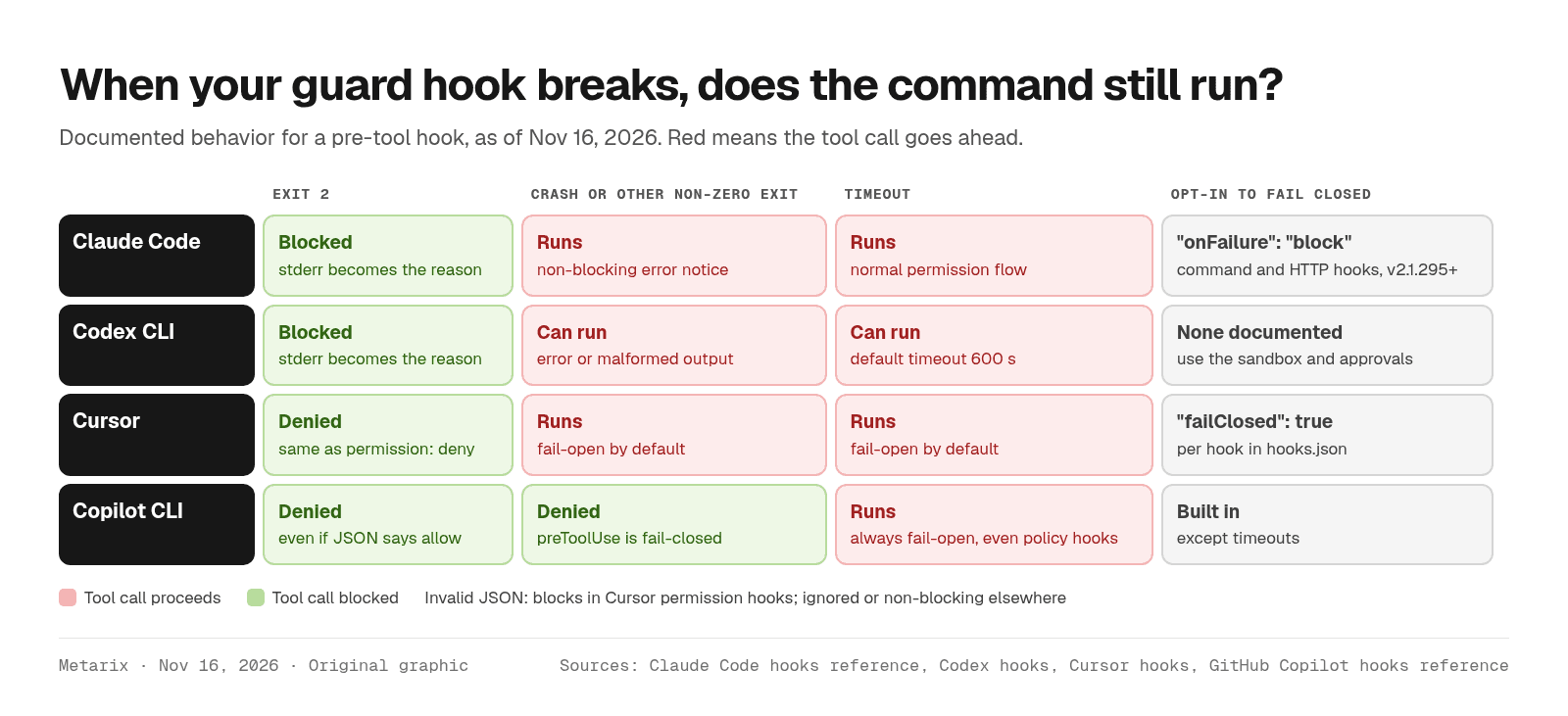
This is where teams get hurt. A guard hook with a typo in its path, a missing jq, or a slow network call doesn't block anything in most tools. The command just runs.
- Claude Code: any exit code other than 0 or 2 is a non-blocking error, and a timed-out PreToolUse hook lets the call continue to the normal permission flow. Set
"onFailure": "block"on command or HTTP hooks (v2.1.295 or later) to fail closed (hooks reference). - Codex CLI: Codex says a PreToolUse "error, timeout, or malformed response can let the tool run," and calls tool hooks "a useful guardrail, not a complete enforcement boundary" (Codex hooks). Hosted tools such as web search skip the hook path entirely.
- Cursor: crashes, timeouts and non-zero exits other than 2 fail open by default. Add
"failClosed": trueto the hook definition. Invalid JSON from a permission hook already blocks (Cursor hooks). - Copilot CLI: command preToolUse hooks fail closed on crashes and non-zero exits, but timeouts always fail open, even for admin-deployed policy hooks (hooks reference).
A portable guard hook you can adapt
The script below blocks four risky patterns: force-pushes, recursive deletes of / or home, commands that touch credential files, and piping a download into a shell. It reads the command from wherever each tool puts it and blocks with exit 2. For Antigravity, which expects a JSON decision, it prints one instead. It's illustrative: adjust the patterns to your repo.
#!/usr/bin/env python3# guard.py: block a few risky shell commands before the agent runs them.import json, re, sysBLOCK = [ (r"\bgit\s+push\b.*(--force\b|-f\b)", "force-push is not allowed"), (r"\brm\s+-[a-z]*r[a-z]*\s+(/|~|\$HOME)(\s|$)", "recursive delete of / or home"), (r"(\.env\b|id_rsa|\.aws/credentials)", "touches a credential file"), (r"\b(curl|wget)\b[^|]*\|\s*(ba|z)?sh\b", "pipes a download into a shell"),]try: event = json.load(sys.stdin)except Exception: print("guard: could not parse hook input", file=sys.stderr) sys.exit(2) # fail closed on bad inputantigravity = "toolCall" in eventif antigravity: cmd = (event["toolCall"].get("args") or {}).get("CommandLine", "")else: args = event.get("tool_input") or event.get("toolArgs") or {} if isinstance(args, str): # Copilot CLI camelCase sends a JSON string try: args = json.loads(args) except ValueError: args = {"command": args} cmd = event.get("command") or args.get("command") or "" # Cursor: top levelfor pattern, reason in BLOCK: if re.search(pattern, cmd): if antigravity: print(json.dumps({"decision": "deny", "reason": reason})) sys.exit(0) print(f"Blocked by guard.py: {reason}", file=sys.stderr) sys.exit(2)if antigravity: print(json.dumps({"decision": "allow"}))sys.exit(0) # no decision: normal permission flow applies
Wire it up
Register the same script in each tool's hook file. Paths below assume you commit it to the repo; resolve from the git root so it still works when the agent starts in a subdirectory.
// Claude Code: .claude/settings.json{ "hooks": { "PreToolUse": [ { "matcher": "Bash", "hooks": [ { "type": "command", "command": "python3 \"$CLAUDE_PROJECT_DIR\"/.agent-hooks/guard.py", "onFailure": "block" } ] } ] } }// Codex CLI: .codex/hooks.json (then trust it in /hooks){ "hooks": { "PreToolUse": [ { "matcher": "^Bash$", "hooks": [ { "type": "command", "command": "python3 \"$(git rev-parse --show-toplevel)/.agent-hooks/guard.py\"", "timeout": 10 } ] } ] } }// Cursor: .cursor/hooks.json{ "version": 1, "hooks": { "beforeShellExecution": [ { "command": "python3 .agent-hooks/guard.py", "failClosed": true } ] } }// Copilot CLI and cloud agent: .github/hooks/guard.json{ "version": 1, "hooks": { "preToolUse": [ { "type": "command", "bash": "python3 .agent-hooks/guard.py", "timeoutSec": 10 } ] } }
What we tested, and what we didn't
In this session we ran guard.py (Python 3.13) against sample hook payloads shaped like each vendor's documented input. It exited 2 for git push --force, cat .env, curl ... | bash and rm -rf ~, returned a JSON deny for an Antigravity git push -f, failed closed on malformed input, and let npm test, git status and rm -rf build/ through. We did not run it inside each agent, so confirm it fires with a harmless test command before you rely on it.
The test also showed the limit of pattern matching. A force-push hidden in bash -c "$(printf %s ... | base64 -d)" sailed through. Regex hooks stop accidents, not a determined attacker or a hijacked model. That's what the sandbox, deny rules and short-lived credentials are for, as the AGENTS.md hijack in the Downloads folder showed.
Hooks for quality, not just safety
Most hooks in the wild are about consistency rather than security, and they're where hooks save the most time:
- Format after every edit. A PostToolUse hook on
Edit|Write(Claude Code, Codex) orafterFileEdit(Cursor) runs Prettier, Black orgofmt, so diffs stay clean without asking the model. - Refuse to stop on red tests. A Stop hook that exits 2 sends Claude Code or Codex back to work with the reason; Copilot's
agentStopcan returndecision: "block"for another turn. Cursor caps stop-hook loops at 5 by default, so set a limit on your own scripts too. - Audit everything. A PostToolUse or
afterShellExecutionhook that appends each command to a log gives you a record of what the agent did, which helps when you review parallel agents working in git worktrees. - Inject context at start. SessionStart hooks can add the current branch, open ticket or on-call notes so the model doesn't have to ask.
Keep hooks fast. Claude Code and Codex default most command hooks to a 600-second timeout and Copilot to 30 seconds, but a pre-tool hook runs on every matching call, and Claude Code's UserPromptSubmit hooks get only 30 seconds by default (hooks reference). Anything slow, such as a remote policy check, belongs in a background hook or a cached lookup.
Rolling hooks out to a team
Scroll the table horizontally on smaller screens.
| Tool | Managed location | Lock-down options |
|---|---|---|
| Claude Code | Managed policy settings (server-managed or MDM) | allowManagedHooksOnly; disableBypassPermissionsMode; disableAutoMode; allowedHttpHookUrls |
| Codex CLI | requirements.toml (system, MDM or cloud) | allow_managed_hooks_only; [features].hooks = true to force hooks on; allowed approval policies |
| Cursor | /etc/cursor/hooks.json (Linux) and OS equivalents; team hooks in the dashboard (Enterprise) | Priority Enterprise > Team > Project > User; deny wins across sources |
| Copilot CLI | /etc/github-copilot/policy.d/*.json (root-owned) or Windows registry | Policy hooks load first and ignore disableAllHooks; admins can block allow-all options |
Two rollout tips. First, treat repo hook files as code that runs on every contributor's machine: Codex makes you trust each hook by hash, and Cursor and Copilot only run project hooks in trusted workspaces, but a malicious pull request can still add one. Review changes to .claude/, .codex/, .cursor/ and .github/hooks/ like you'd review CI config. For a one-off headless Claude Code run in a repo you didn't write, Anthropic suggests --bare, which skips project hooks, skills and plugins. Second, test cloud agents separately. Copilot cloud agent runs only a subset of events, treats ask as deny, and its firewall blocks HTTP hooks to hosts that aren't allowlisted. Cursor's cloud agents skip hooks during early read-only turns and don't load your ~/.cursor/hooks.json.
Verdict
Start with permissions, not hooks. Deny credential reads and destructive commands, ask before push and deploy, allow your build and test commands, and keep the sandbox on. That covers most of the risk in an afternoon.
Then add one PreToolUse hook for the rules that must be exact, and make it fail closed: onFailure: "block" in Claude Code, failClosed: true in Cursor, and short timeouts everywhere, since Copilot timeouts and Codex hook errors still let calls through. Use the rest of the hook surface for formatters, audit logs and stop checks, where it saves real time. If you're still choosing an agent, our comparison of AI CLI coding agents covers pricing and fit.
Sources
- Claude Code: Hooks reference and hooks guide (Anthropic; accessed Nov 16, 2026)
- Claude Code: Configure permissions (Anthropic; accessed Nov 16, 2026)
- Codex: Hooks (OpenAI; accessed Nov 16, 2026)
- Codex: Agent approvals and security (OpenAI; accessed Nov 16, 2026)
- Cursor: Hooks, Run Modes and CLI permissions (Cursor; accessed Nov 16, 2026)
- GitHub Copilot: About hooks and hooks reference (GitHub; accessed Nov 16, 2026)
- GitHub Copilot CLI: Allowing and denying tool use (GitHub; accessed Nov 16, 2026)
- Google Antigravity: Hooks (Google; accessed Nov 16, 2026)
Tools covered in this guide
Frequently asked questions
- What is a PreToolUse hook?
- A PreToolUse hook is a script a coding agent runs just before it executes a tool call, such as a shell command or file edit. The agent passes the call as JSON on stdin, and the script can allow it, block it (usually with exit code 2), ask the user, or rewrite the input. Claude Code, Codex CLI, Cursor and GitHub Copilot CLI all support one.
- Can a hook override a deny rule in Claude Code?
- No. Claude Code checks deny and ask rules regardless of what a PreToolUse hook returns. A matching deny rule still blocks the call and a matching ask rule still prompts, even if the hook returned allow. Hooks can tighten permissions but not loosen a deny.
- Do agent hooks fail open or fail closed?
- Mostly open by default. In Claude Code and Cursor, a crashing or timed-out pre-tool hook lets the call through unless you set onFailure: "block" or failClosed: true. Codex says errors and timeouts can let the tool run. Copilot CLI fails closed on crashes but open on timeouts.
- Where do Cursor hooks go?
- In a hooks.json file: .cursor/hooks.json in the project root for project hooks, or ~/.cursor/hooks.json for user hooks. Enterprise admins can deploy system-wide files (for example /etc/cursor/hooks.json on Linux) and team hooks from the dashboard. Cloud agents run project, team and enterprise hooks but not user-level ones.
- Is approval_policy untrusted still supported in Codex?
- No. OpenAI's docs say Codex no longer supports approval_policy = "untrusted" and that the retired value can stop the client from starting. For read-only interactive use, set sandbox_mode = "read-only" with approval_policy = "on-request", or mark the project trust_level = "untrusted" in your user config.