Comparison · Hosting & inference
vLLM vs SGLang vs TensorRT-LLM: Which to Use
The three leading open-source LLM inference engines compared on hardware, prefix caching, disaggregated serving and release churn, with setup commands and a clear pick for each situation.
Metarix Editorial · Nov 14, 2026 · 11 min read
Documentation-based research
On this page
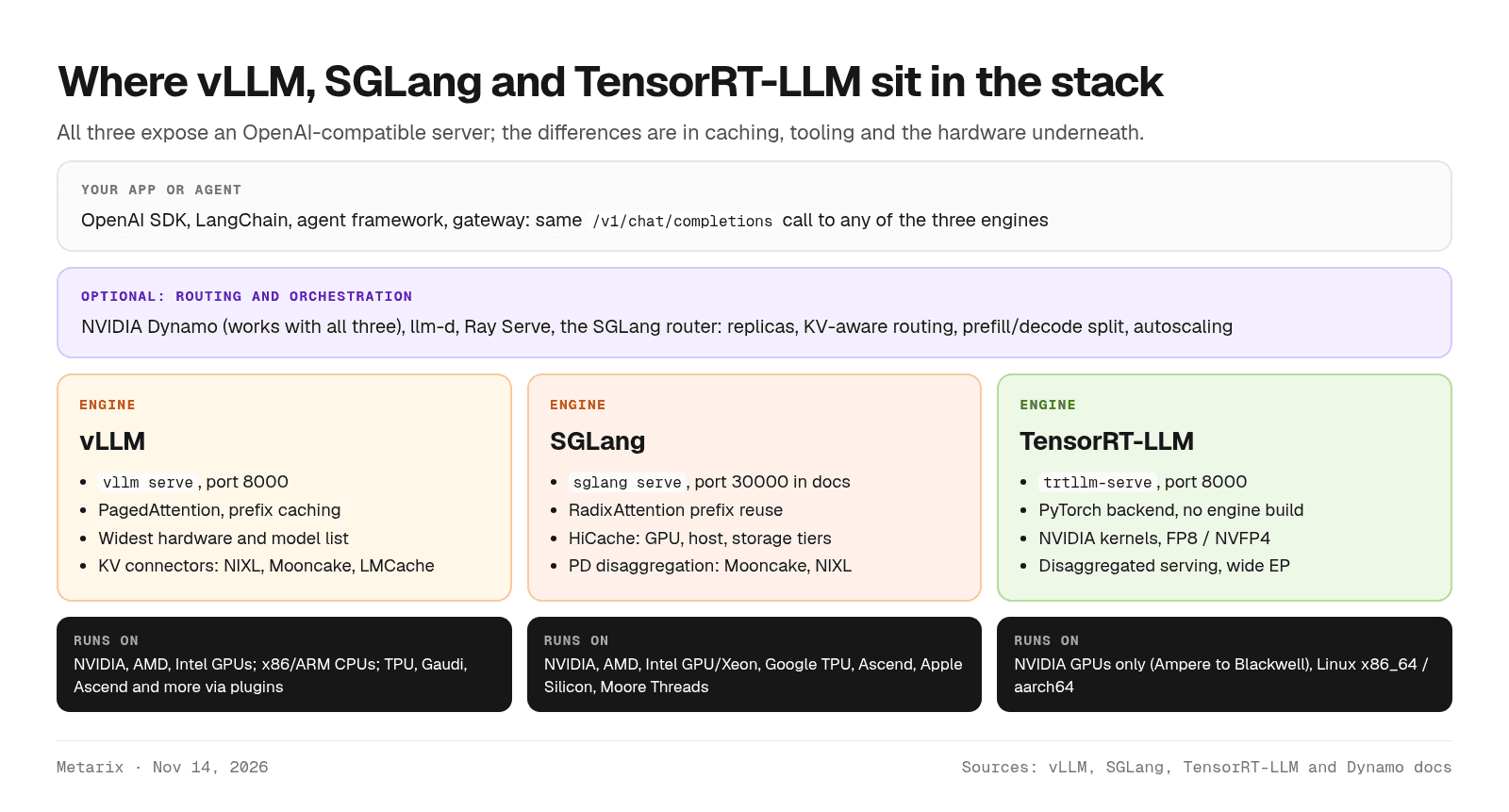
vLLM, SGLang and TensorRT-LLM are the three open-source engines most teams pick between when they serve open-weight models on their own GPUs. All three are free, Apache 2.0 licensed and expose an OpenAI-compatible API, so the real differences are hardware support, how they reuse cached prompts, and how much operational churn you can absorb.
This comparison covers what each engine is good at as of Nov 14, 2026, a feature and hardware table, the commands to start each one, what published performance numbers can and can't tell you, and a decision flow for choosing.
Quick answer
Start with vLLM if you want the safe default: the largest contributor base, the longest list of supported models and accelerators, and the most material when something breaks. Try SGLang when your traffic reuses long prefixes, such as agents, multi-turn chat or RAG with a fixed system prompt, or when you need its hierarchical KV cache. Benchmark TensorRT-LLM when your fleet is all NVIDIA and squeezing the most tokens per GPU justifies tracking frequent release candidates. Whatever you choose, test it on your own model, prompts and SLOs before committing.
Scroll the table horizontally on smaller screens.
| Spec | vLLM | SGLang | TensorRT-LLM |
|---|---|---|---|
| Maintainer | vLLM community (started at UC Berkeley's Sky Computing Lab) | LMSYS (non-profit), sgl-project | NVIDIA |
| License | Apache 2.0 | Apache 2.0 | Apache 2.0 (per README) |
| Latest stable release | v0.32.0 (Oct 18, 2026); v0.33.0 in release candidates | v0.5.23 (Nov 2, 2026) | v1.2.1 (Apr 20, 2026); v1.4.0rc3 (Nov 6, 2026) |
| Start a server | vllm serve <model> | sglang serve <model> | trtllm-serve <model> |
| Hardware | NVIDIA, AMD, Intel GPUs, CPUs; TPU, Gaudi, Ascend and others via plugins | NVIDIA, AMD, Intel, Google TPU, Ascend, Apple Silicon, Moore Threads | NVIDIA GPUs only |
| Signature feature | PagedAttention KV memory management | RadixAttention prefix reuse, HiCache | NVIDIA-tuned kernels and FP8/FP4 recipes |
| Best fit | Default choice, mixed hardware, widest model coverage | Agentic, multi-turn and prefix-heavy traffic | All-NVIDIA fleets chasing peak efficiency |
What an inference engine actually does
An inference engine turns a model checkpoint into a server that can handle many requests at once. The hard part isn't running the model; it's scheduling. The engine batches requests continuously, splits work into prefill (reading the prompt) and decode (generating tokens), and manages the KV cache, the per-request memory that grows with every token and usually decides how many users fit on a GPU.
That is why the metrics that matter are time to first token, inter-token latency and goodput rather than a single tokens-per-second figure. If those terms are new, start with our explainer on LLM latency and throughput.
vLLM: the broad default
vLLM began at UC Berkeley around PagedAttention, a way to store the KV cache in fixed-size blocks so memory isn't wasted on fragmentation. Its README now lists continuous batching, chunked prefill, prefix caching, CUDA and HIP graphs, torch.compile, speculative decoding (n-gram, suffix, EAGLE and DFlash), and disaggregated prefill, decode and encode. It credits more than 2,000 contributors.
Where it's strong
- Coverage. The README claims support for 200+ model architectures from Hugging Face, including MoE, hybrid state-space, multimodal, embedding and reward models.
- Hardware breadth. NVIDIA, AMD and Intel GPUs and x86, ARM and PowerPC CPUs are supported directly, with plugins for Google TPUs, Intel Gaudi, Huawei Ascend, Apple Silicon and others.
- APIs. An OpenAI-compatible server plus Anthropic Messages API and gRPC support, tool-call and reasoning parsers, multi-LoRA, and structured outputs through XGrammar or Guidance.
- KV cache plumbing. Automatic prefix caching skips recomputing shared prompt prefixes, and KV connectors such as NIXL, Mooncake, LMCache and a CPU offloading connector move cache data between instances or tiers.
What to watch
- Disaggregated prefilling is still marked experimental in the vLLM docs, which also note that it does not improve throughput; it helps you tune TTFT and tail latency separately.
- Releases land roughly every two weeks with breaking changes. The v0.33.0 release notes (release candidate as of Nov 14, 2026) say wheels and images are now CUDA 13.0 only, and the LM Format Enforcer structured-output backend is deprecated, due for removal in v0.35.0.
SGLang: built for prefix reuse
SGLang came out of LMSYS research on structured language model programs and is now a full serving framework. Its docs say it runs production deployments generating trillions of tokens a day across more than 400,000 GPUs; that is the project's own claim, not an audited figure.
Where it's strong
- RadixAttention. SGLang keeps cached prefixes in a radix tree, so requests that share a system prompt, a document or earlier chat turns reuse that work automatically. This suits agent loops, where every step resends a long, mostly identical context.
- Hierarchical caching. HiCache extends the prefix cache from GPU memory into host memory and external storage, which helps when the working set of conversations is bigger than VRAM.
- Distributed serving. PD disaggregation splits prefill and decode onto different workers, with Mooncake and NIXL as transfer engines, plus data-parallel attention and a router for spreading load.
- Structured outputs. JSON schema, regex or EBNF constraints, with XGrammar as the default backend and Outlines or llguidance as options (docs).
- Hardware. The README lists NVIDIA, AMD Instinct, Google TPU (v6e, v7), Intel GPUs and Xeon CPUs, Apple Silicon, Huawei Ascend and Moore Threads, with more integrations in progress.
What to watch
- The quickstart installs with
uv pip install --prerelease=allow sglang, and the project ships a release about every two weeks. Pin versions and read the release notes before upgrading. - Model-specific launch flags matter. Use the SGLang Cookbook's recipe for your model and GPU rather than defaults.
TensorRT-LLM: NVIDIA's own engine
TensorRT-LLM is NVIDIA's library for LLM inference on its GPUs, with custom attention, GEMM and MoE kernels, prefill-decode disaggregation, wide expert parallelism and speculative decoding, according to its README.
The big change: no more engine builds
If your picture of TensorRT-LLM involves trtllm-build and per-model checkpoint conversion, it's out of date. NVIDIA's migration guide (last updated Nov 3, 2026) says the TensorRT engine backend has been removed: PyTorch is the only execution backend, and Hugging Face checkpoints load directly with trtllm-serve <model>. The 1.3 and 1.4 release candidates removed the remaining TensorRT-backend code. That makes TensorRT-LLM much closer to vLLM and SGLang in day-to-day use.
Where it's strong
- NVIDIA-first optimizations. Quantization recipes include FP4, several FP8 variants, FP8 and NVFP4 KV caches and GPTQ/AWQ, and it runs pre-quantized checkpoints from NVIDIA Model Optimizer directly.
- KV cache reuse by default. Blocks are stored in a radix search tree and reused across requests, with offloading to secondary memory and priority-based eviction (docs).
- Serving features. trtllm-serve exposes OpenAI-style completions, chat and responses endpoints,
/metrics, and tool and reasoning parsers. Guided decoding uses XGrammar or LLGuidance, switched on in the YAML config.
What to watch
- NVIDIA only. The support matrix lists Blackwell, Grace Hopper, Hopper, Ada Lovelace and Ampere on Linux x86_64 or aarch64. There is no AMD, Intel or TPU path.
- Release cadence. As of Nov 14, 2026, the latest stable GitHub release is v1.2.1 from April 2026, while current features ship in 1.3 and 1.4 release candidates, each with a list of breaking changes (releases). Plan to pin a release candidate or a container and test upgrades.
Feature comparison
Scroll the table horizontally on smaller screens.
| Feature | vLLM | SGLang | TensorRT-LLM |
|---|---|---|---|
| OpenAI-compatible server | Yes, plus Anthropic Messages API and gRPC | Yes (chat, completions, vision, embeddings) | Yes (models, completions, chat, responses) |
| Prefix / KV cache reuse | Automatic prefix caching | RadixAttention (radix tree) | Block reuse in a radix search tree, on by default |
| KV offload beyond GPU | CPU offloading and LMCache connectors | HiCache: host memory and storage tiers | Secondary-memory offload with priority eviction |
| Prefill/decode disaggregation | Yes, marked experimental (NIXL, Mooncake, LMCache and others) | Yes (Mooncake, NIXL) | Yes, via trtllm-serve or Dynamo |
| Structured outputs | XGrammar, Guidance | XGrammar (default), Outlines, llguidance | XGrammar, LLGuidance |
| Speculative decoding | n-gram, suffix, EAGLE, DFlash | Yes, including adaptive speculative decoding | Yes |
| Quantization highlights | FP8, MXFP4, NVFP4, INT8/INT4, GPTQ, AWQ, GGUF | FP8, AWQ, MXFP4 and more (hardware-dependent) | FP4, FP8 variants, NVFP4 KV cache, GPTQ, AWQ |
| Multi-LoRA serving | Yes | Yes | Yes |
Scroll the table horizontally on smaller screens.
| Hardware | vLLM | SGLang | TensorRT-LLM |
|---|---|---|---|
| NVIDIA GPUs | Yes | Yes | Yes (Ampere to Blackwell) |
| AMD GPUs | Yes (ROCm) | Yes (Instinct MI300X to MI355X) | No |
| Intel | GPUs and CPUs; Gaudi via plugin | Arc GPUs, Xeon CPUs | No |
| Google TPU | Via vllm-tpu plugin | v6e, v7 (TorchTPU or JAX path) | No |
| Huawei Ascend | Via plugin | Yes | No |
| Apple Silicon | Via plugin | Yes (Metal / MLX) | No |
Getting started: one model, three servers
The commands below are illustrative and were not run for this article (it needs a GPU host); they come from each project's quickstart as of Nov 14, 2026. Each starts an OpenAI-compatible server for the same Hugging Face model.
# vLLM: serves on http://localhost:8000 by defaultuv pip install vllmvllm serve Qwen/Qwen3-8B# SGLang: Docker image, port 30000 as in the quickstartdocker run --rm --gpus all --ipc=host -p 30000:30000 \ lmsysorg/sglang:latest \ sglang serve Qwen/Qwen3-8B --host 0.0.0.0 --port 30000# TensorRT-LLM: inside NVIDIA's release container; no engine buildtrtllm-serve Qwen/Qwen3-8B
Because all three speak the same API, switching engines is a URL change in your client:
from openai import OpenAI# Point base_url at whichever engine you are testingclient = OpenAI(base_url="http://localhost:8000/v1", api_key="not-used")r = client.chat.completions.create( model="Qwen/Qwen3-8B", messages=[{"role": "user", "content": "Summarize PagedAttention in one line."}],)print(r.choices[0].message.content)
That portability is the main reason not to over-think the first choice. Keep engine-specific request fields, such as structured-output parameters, behind a thin wrapper so you can rerun the same workload on another engine later. If you're still deciding where the GPUs come from, see our comparisons of serverless GPU inference and spot vs reserved GPUs.
What about performance?
There is no neutral, current, apples-to-apples benchmark of the three engines that holds across models and GPUs. Each project publishes its own results, usually on a model and configuration it has tuned, and the numbers change with every release. Vendor charts show what is possible on a tuned setup, not what you will see on yours.
Results also flip with workload shape. Prefix-heavy agent traffic favors whichever engine gets the most cache hits; short independent prompts at high concurrency stress batching and decode kernels instead; and a new MoE model may be well-optimized in one engine weeks before the others. So treat any single "X is 2x faster" claim as a starting hypothesis.
The reliable approach is to run the same client, dataset and load sweep against each engine on your hardware and compare goodput at your latency targets. Our guide to benchmarking LLM inference covers the method and tools, including vLLM's and SGLang's built-in benchmark clients, which can both target the other engines.
How to choose
Scroll the table horizontally on smaller screens.
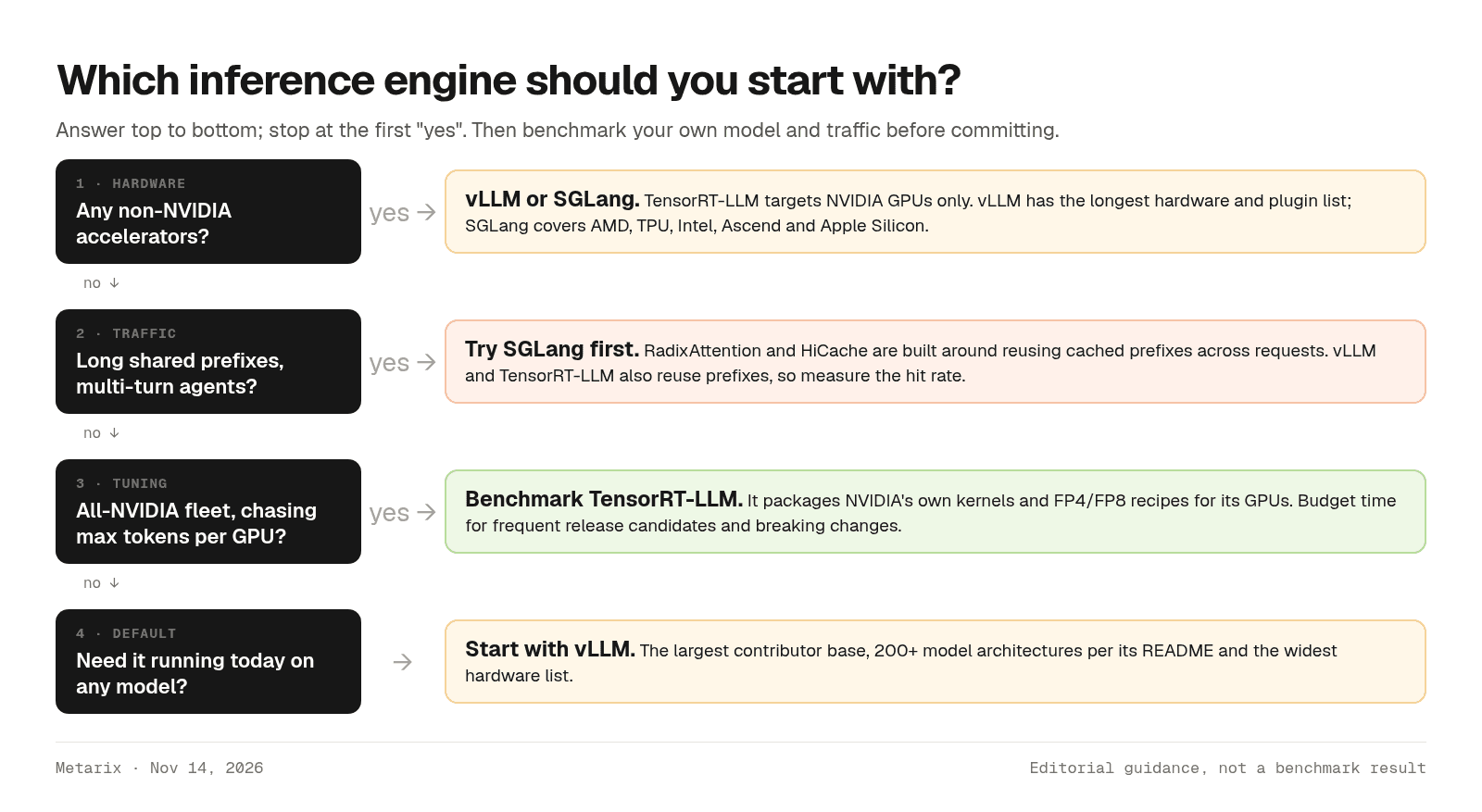
| If you... | Start with | Why |
|---|---|---|
| Need AMD, TPU, Intel or other non-NVIDIA hardware | vLLM or SGLang | TensorRT-LLM supports NVIDIA GPUs only |
| Run agents or multi-turn chat with long shared context | SGLang | Prefix reuse is its core design; HiCache adds memory tiers |
| Want the most models and community answers | vLLM | 200+ architectures and 2,000+ contributors per its README |
| Run an all-NVIDIA fleet and need peak tokens per GPU | TensorRT-LLM (benchmark against the others) | NVIDIA's kernels and FP4/FP8 recipes |
| Plan multi-node, disaggregated serving | Any, behind NVIDIA Dynamo or llm-d | Dynamo works with all three engines |
You don't have to pick only one
Orchestration layers increasingly treat the engine as a plug-in. NVIDIA Dynamo says it works with vLLM, SGLang and TensorRT-LLM and adds disaggregated serving, KV-aware routing and autoscaling on top; SGLang also lists llm-d and Ray Serve as deployment options. Some teams run one engine for most models and another where it is clearly faster for a specific model.
Common mistakes
- Following old TensorRT-LLM tutorials. Engine builds and
convert_checkpoint.pyscripts are gone from current releases. Usetrtllm-servewith a Hugging Face checkpoint. - Comparing engines at default settings. Defaults differ in memory fraction, batch limits, prefix caching and warmup. Tune each one, or at least use each project's recommended recipe for your model.
- Benchmarking with random prompts when production shares prefixes. You'll miss the cache effects that may decide the winner. Replay realistic traffic.
- Upgrading blindly. All three ship fast and break things. Pin a version or container digest, and run your eval and load test before rolling forward.
- Exposing the server directly. Treat these servers as internal services and put an API gateway with authentication and rate limits in front of any public endpoint.
Verdict
For most teams, vLLM is the right first engine: it runs on the most hardware, supports the most models and has the largest community, so you'll spend less time blocked. Choose SGLang when your workload is agentic or multi-turn and prefix reuse dominates, or when its hierarchical cache fits your memory problem; it's a peer to vLLM, not a niche tool. Choose TensorRT-LLM only when you are committed to NVIDIA hardware and have measured a gain worth the faster churn of its release candidates.
Because all three share the same API, the decision is reversible. Pick one, wrap it behind a stable client, and rerun a proper benchmark whenever a major release or a new model lands.
Sources
- vLLM on GitHub (README and releases) (accessed Nov 14, 2026)
- vLLM docs: Quickstart, Automatic Prefix Caching, Disaggregated Prefilling, Structured Outputs (accessed Nov 14, 2026)
- SGLang on GitHub (README and releases) (accessed Nov 14, 2026)
- SGLang docs: Overview, Quickstart, PD Disaggregation, HiCache, Structured Outputs (accessed Nov 14, 2026)
- TensorRT-LLM on GitHub (README and releases) (accessed Nov 14, 2026)
- TensorRT-LLM docs: Quick Start, Migration Guide: TensorRT Backend Removed, Support Matrix, KV Cache, Quantization, trtllm-serve (accessed Nov 14, 2026)
- NVIDIA Dynamo documentation (accessed Nov 14, 2026)
- Kwon et al., Efficient Memory Management for Large Language Model Serving with PagedAttention (arXiv)
- Zheng et al., SGLang: Efficient Execution of Structured Language Model Programs (arXiv)
Tools covered in this guide
Frequently asked questions
- Is SGLang faster than vLLM?
- It depends on the model, hardware and traffic. SGLang is designed around reusing cached prefixes, so it often suits agentic and multi-turn workloads, while vLLM is often as fast on other workloads. Both projects publish their own benchmarks, which aren't directly comparable. Run the same load test on your own model and GPUs before deciding.
- Does TensorRT-LLM still require building a TensorRT engine?
- No. NVIDIA's migration guide, last updated Nov 3, 2026, says the TensorRT engine backend has been removed and PyTorch is the only execution backend. Hugging Face checkpoints load directly with trtllm-serve or the Python LLM API, with no trtllm-build or checkpoint conversion step.
- Can vLLM, SGLang and TensorRT-LLM run on AMD GPUs?
- vLLM and SGLang support AMD GPUs; SGLang lists Instinct MI300X through MI355X, and vLLM supports ROCm. TensorRT-LLM supports NVIDIA GPUs only.
- Are vLLM, SGLang and TensorRT-LLM free?
- Yes. All three are open source under the Apache 2.0 license. You pay for the GPUs or cloud instances they run on, plus any managed platform you use to host them.
- Can I switch inference engines without changing my application?
- Mostly. All three expose OpenAI-compatible chat and completions endpoints, so switching is usually a base URL change. Engine-specific request options, such as structured-output parameters and server flags, differ and need testing.