Productivity · News
The Agent Now Runs in Your Container
VS Code 1.138 can put the agent inside the project's Dev Container. Same Python, same Node, same CLI as CI. Docker is required. Podman is not.
Alex Rivera · Sep 19, 2026 · Updated Oct 4, 2026 · 13 min read
On this page
Coding agents have been running on your laptop's Python. Your project may not use that Python.
Visual Studio Code 1.138, dated 16 September 2026, lets an agent session start inside the folder's Dev Container. Enable chat.agentHost.devContainer.enabled. If the folder has a supported devcontainer.json, the Agents window grows a Use Dev Container action. Pick it, and the agent gets the container's runtime, libraries, and CLI tools. Not whatever you installed in 2022 and forgot.
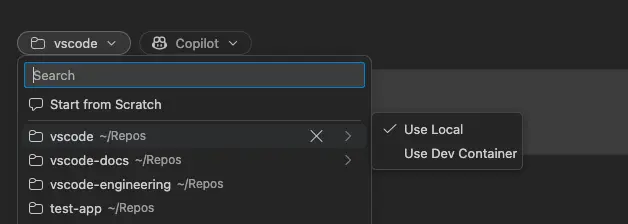
Image: Microsoft, Visual Studio Code 1.138 release notes, 16 September 2026.
Why this is the actual 1.138 story
The rest of the release is session hygiene: mark merged sessions done, optional auto-delete, a badge when a session needs you, confetti if you want it. Fine. The environment split is the one that has been quietly breaking CI. An agent that "passes" on 3.11 while the container and the pipeline are on 3.12 is not a smart assistant. It is a flaky intern with the wrong laptop.
Docker has to be installed. Podman is not supported for these host sessions. The feature is rolling out, so you may have to flip the setting yourself. Microsoft also forwards your host Git identity into the container when it is missing, so agent commits are not anonymous noise.
Codex can change rooms
1.138 also lets a Codex session move between the ChatGPT app and VS Code without starting over. If you are signed into both Copilot and ChatGPT, the model picker can switch which seat is paying without dropping the thread. Codex in VS Code can use the editor's tools, including MCP, and with a ChatGPT-backed model it can use image generation in the session. That is convenient. It is also a reminder that the agent now has two vendors in one window.
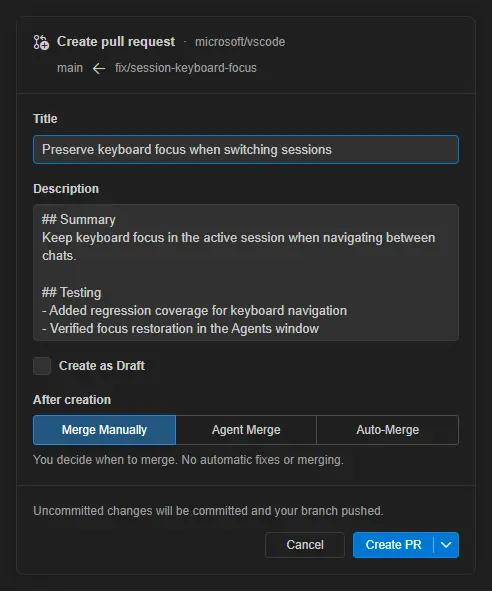
Image: Microsoft, Visual Studio Code 1.138 release notes, 16 September 2026.
You can open a pull request from the Agents window: edit the title, pick draft, send it. GitHub's Copilot changelog for the week of 14 September repeats the Dev Container note and the PR form. The release notes themselves were generated with GitHub Copilot and say they might be wrong. That sentence is doing a lot of work. Cross-check the setting names in your own build.
If your repo already has a Dev Container, turn this on and watch the first install. If it does not, this is a decent reason to add one. The agent is now another teammate. It should not get a special, dirtier environment than CI.
Sources
Microsoft, Visual Studio Code 1.138, 16 September 2026. https://code.visualstudio.com/updates/v1_138
GitHub Changelog, GitHub Copilot weekly releases — September 14, 18 September 2026. https://github.blog/changelog/2026-09-18-github-copilot-weekly-releases-september-14/