Cloud · Analysis
Neptune Graph Sessions: What Per-Agent Graphs Cost
AWS's new Neptune Graph Sessions bill per second and stop after 15 idle minutes. A 4 GiB session costs about half the smallest provisioned graph, but idle tails and a default cap of 10 running sessions shape per-user designs.
Nalini Groves · Nov 28, 2026 · 7 min read
On this page
AWS made Neptune Graph Sessions generally available on Nov 27, 2026. They are Neptune Analytics graphs that start at 4 or 8 GiB of memory, stop after 15 minutes without traffic and resume in under 20 seconds, and AWS pitches them as one graph per agent, user or task. Two constraints decide whether that works for you: the 15-minute idle tail, which you pay for and which is most of the bill for short agent turns, and default quotas of 25 sessions per Region with only 10 running at once.
Below: what shipped, how the price compares with a provisioned graph, three agent usage patterns costed at list price, where one-graph-per-user stops being cheaper than one shared graph, and the code changes to make before you switch.
What shipped on Nov 27
A graph session runs the same Neptune Analytics engine as a provisioned graph, with the same openCypher queries, APIs and IAM permissions. The difference is compute. AWS's pricing page says sessions run in isolated Lambda MicroVMs, and the sessions guide defines the billing unit: one s-NCU is 1 GiB of memory and 0.25 vCPU, billed per second while the session is Running.
You pick a starting size of 4 or 8 s-NCU. Memory can grow to twice that, and CPU can burst to about twice the starting vCPU at no extra charge, but only the extra memory raises the bill. At the burst limit the session is throttled, and the fix is UpdateGraph to the larger size or to a provisioned graph. The starting size never changes by itself.
Scroll the table horizontally on smaller screens.
| Constraint | Provisioned graph | Graph session |
|---|---|---|
| Size | 16 m-NCU (16 GiB) and up | Starts at 4 or 8 s-NCU; memory can reach 8 or 16 GiB |
| Billing | Per hour at the size you set; a paused graph pays 10% of compute | Per second while Running, for memory used, never below the starting size |
| When idle | Runs until you stop it | Stops after 15 minutes with no traffic |
| Restart | Manual | Under 20 seconds, triggered by the next query |
| Replicas, snapshots, export tasks | Supported | Not supported; export is listed as coming soon |
| CloudFormation | Supported | Coming soon |
| Regions | All Neptune Analytics Regions | 10 Regions at launch |
The 10 launch Regions are US East (N. Virginia and Ohio), US West (Oregon), Mumbai, Singapore, Sydney, Tokyo, Frankfurt, Ireland and Stockholm, per the limits page.
Double the price per GiB, a quarter of the floor
In us-east-1, AWS lists session compute at $0.062 per s-NCU-hour and session storage at $0.225 per GB-month. The smallest provisioned graph, 16 m-NCU, costs $0.48 an hour, which works out to $0.03 per GiB-hour. All prices are in USD, as of Nov 28, 2026.
So a session costs about 2.07 times as much per GiB-hour. It still wins on small graphs because its floor is 4 GiB, not 16. A 4 GiB session that never stops costs $178.56 in a 30-day month. The smallest provisioned graph costs $345.60 with zero replicas, and $691.20 at the API's default of one replica, because each replica is billed like the primary.
AWS's own docs warn that a session running nearly all the time can cost more than a small provisioned graph. That only happens once the session is actually using close to 16 GiB. At that size it bills $0.992 an hour, and the provisioned graph gets cheaper past about 11.6 Running hours a day.
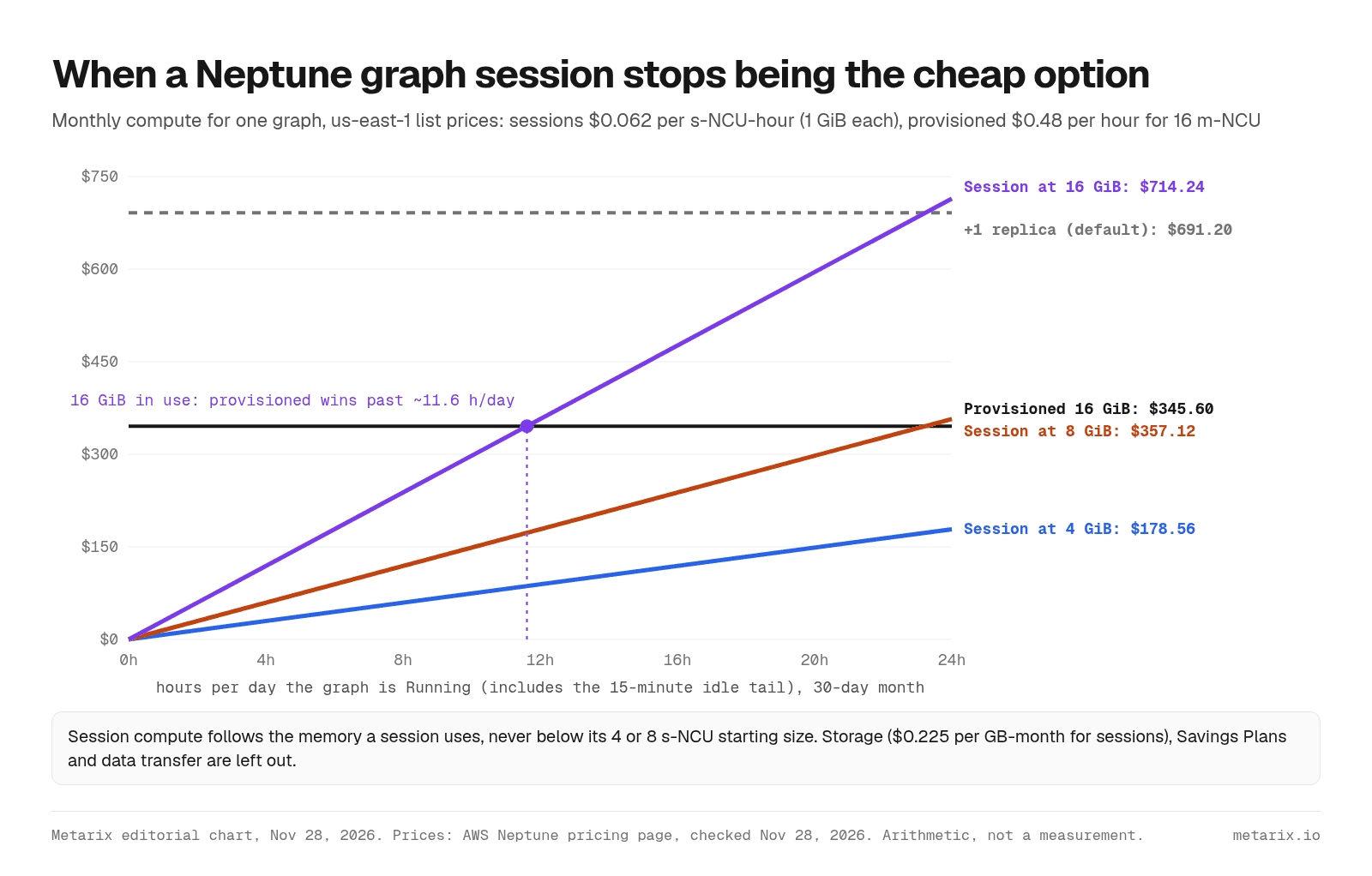
That figure is only for us-east-1. Session compute is $0.068 per s-NCU-hour in Ireland, $0.071 in Mumbai and $0.075 in Tokyo, Singapore, Sydney, Frankfurt and Stockholm. Ohio and Oregon match Virginia. Database Savings Plans take 30% off session compute.
Three agent patterns at list price
The table applies the us-east-1 rates to three usage shapes. Each assumes the session stays inside a 4 GiB starting size, stores 1 GB (the per-session storage minimum), and that bursts are more than 15 minutes apart, so every burst pays its own idle tail.
Scroll the table horizontally on smaller screens.
| Pattern | Running time billed | Hours per month | Compute | With 1 GB storage |
|---|---|---|---|---|
| Dev or test graph: one 30-minute burst per weekday (22 days) | 45 min a day | 16.5 | $4.09 | $4.32 |
| Per-user memory graph: three 5-minute conversations a day | 60 min a day | 30 | $7.44 | $7.67 |
| Business-hours assistant: steady queries 9 hours on 22 weekdays | 9 h 15 min a day | 203.5 | $50.47 | $50.69 |
| Never idle for 15 minutes | 24 h a day | 720 | $178.56 | $178.79 |
Look at the per-user row. Each 5-minute conversation is billed for 20 minutes, so three quarters of that graph's compute is the idle tail. Calling StopGraph when a conversation ends would cut the row to 7.5 hours and $1.86. The catch is that the next query then waits up to 20 seconds for a resume, and AWS's best-practices page recommends relying on automatic stop and start instead. Whether that trade is worth it depends on how much your users notice a 20-second first answer.
One graph per user meets the quota
Scale the per-user pattern to 100 users and the bill is $744 of compute plus $22.50 of storage, $766.50 a month. One shared 16 GiB provisioned graph with no replicas is $345.60, if every user's data fits in it and your queries can keep tenants apart. On these assumptions, separate sessions stop being cheaper at about 45 users.
The quota bites sooner. The limits page sets two defaults per Region per account: 25 Graph Sessions, running or stopped, and 10 Max Active Graph Sessions. A session sitting in its 15-minute idle tail is still Running, so it counts against the 10. If each of 100 users' graphs runs 60 minutes a day, spread evenly over a 10-hour working day, you average 10 Running sessions, already at the default before any peak.
Past that limit, the auto-start page says a stopped session cannot start when a query arrives. Both quotas are adjustable, so request the increase before launch, not after the first failed query. Throughput is also small per graph: about 40 requests per second and up to 150 concurrent connections at 4 vCPU, which only an 8 s-NCU session reaches when it bursts.
What to change in code before you switch
- Replace the deprecated memory parameter. The doc history marks
computeConfigurationas required andprovisionedMemoryas deprecated. A session is--compute-configuration '{"graphSession": {"minMemory": 4}}'; a provisioned graph is{"provisionedGraph": {"memory": 128}}. Responses still returnprovisionedMemory, so readcomputeConfigurationinstead. - Check your SDK first. When Metarix read the CreateGraph API reference on Nov 28, 2026, it still listed
provisionedMemoryas required and did not showcomputeConfiguration. Confirm that your CLI or SDK version accepts the new field before you change scripts. - Leave CloudFormation stacks on provisioned graphs. Session support in CloudFormation is listed as coming soon, and the guide's templates still use
ProvisionedMemory. - Grant the start permission. Add
neptune-graph:StartGraphto the role that runs queries. Without it, a stopped session will not start on the next query. - Retry in your own code. Neptune Analytics rejects queries that an AWS SDK retries automatically after a connection timeout. Set client timeouts to at least 20 seconds for the first query after idle, or send a light warm-up query first.
- Keep queries short and delete what you no longer need. AWS asks for queries that finish in seconds to minutes and for large loads to be split. Stopped sessions still bill storage, at least 1 GB each, until you delete them.
Who should switch, and who should not
Graph Sessions fit agent memory or GraphRAG graphs that are busy for minutes and then idle for hours, per-tenant graphs where most tenants are quiet, and throwaway analysis over data loaded from S3. If the relationships between records do not matter to your agent, a plain vector store is simpler; our vector database comparison covers those options.
Stay provisioned for always-on dashboards, for anything that cannot absorb a 20-second first query, for graphs above 16 GiB, and for workloads that need replicas, snapshots or export tasks. Sessions run on Lambda MicroVMs, which AWS also offers directly as agent sandboxes; our sandbox cost comparison works through the same idle-timer trade-off for code execution, and our AWS agent deployment guide covers the compute around it.
Take
For per-agent or per-tenant graphs that sit idle most of the day, Graph Sessions are the first Neptune option priced for that shape. A 4 GiB session costs about half the smallest provisioned graph even if it never stops. Before you build one graph per user, do two sums: how many sessions will be Running at your peak, counting the 15-minute tail, and whether one shared provisioned graph gets cheaper past roughly 45 users. Then file the quota increase and the IAM change before launch day. Prices and limits checked Nov 28, 2026; Metarix will recheck them by Feb 26, 2027.
Sources
- AWS What's New: Amazon Neptune introduces Neptune Graph Sessions, Nov 27, 2026
- Neptune Analytics User Guide: How Neptune Graph Sessions work
- Neptune Analytics User Guide: Choosing a graph type
- Neptune Analytics User Guide: Create an empty Neptune graph and Modifying a graph
- Neptune Analytics User Guide: Automatic stop and start and Best practices for Graph Sessions
- Neptune Analytics User Guide: Limits and Document history
- Neptune Analytics API Reference: CreateGraph
- Amazon Neptune pricing, checked Nov 28, 2026
Tools covered in this article
Frequently asked questions
- Are Neptune Graph Sessions the same as Neptune Serverless?
- No. Graph Sessions are a graph type in Neptune Analytics, the in-memory analytics engine. Neptune Serverless is a capacity setting for Neptune Database, the transactional graph database. AWS points sustained, low-latency transactional workloads to Neptune Database.
- Can I convert an existing provisioned graph into a session?
- Yes, with UpdateGraph and a new computeConfiguration, as long as the graph's data fits within a session. The same call converts a session back to a provisioned graph, for example when it outgrows the 8 s-NCU starting size.
- What happens when a session runs out of memory?
- It can use up to twice its starting size, and you pay for that extra memory. At that limit the session is throttled and queries slow down. AWS's fix is a larger starting size or a provisioned graph.
- Does a stopped session cost anything?
- Only storage. A stopped session has no compute charge but keeps its graph data, vector indexes and configuration, billed per GB-month with a 1 GB minimum per session. Deleting the session ends both charges.